
A receipt tracking app for small business has one job as far as the IRS is concerned: keep each expense’s amount, date, place and business purpose retrievable for at least 3 years after you file. The common mistake is shopping for the slickest scanner before checking that the app can do this.
Price comes second, and the published plans spread out more than you might expect. Zoho Expense is free for up to 3 users, Expensify Collect lists $5 per member per month, Ramp’s base plan is $0 if your company qualifies, and QuickBooks Online includes receipt capture in every plan but saves employee expense claims for its $340-a-month Advanced tier. Prices below come from each vendor’s public pricing page, read on November 3, 2026.
What the IRS expects a receipt record to show
The four details every record needs
IRS Publication 463 says documentary evidence is ordinarily adequate when it shows the amount, date, place, and essential character of the expense. A store receipt usually covers the first three. The business purpose rarely appears on the receipt itself, and Publication 463 says you generally need a written statement of it unless the purpose is clear from the surrounding circumstances.
That is the field to test in any app you try. If a receipt can sit in the system without a memo or category, some entries will arrive blank, and a $46 restaurant charge with no note looks the same as a personal dinner.
“A canceled check by itself doesn’t prove a business expense without other evidence to show that it was for a business purpose.” IRS Publication 463, Recordkeeping
The same logic applies to a card statement line. It proves the money left the account. It does not say what was bought or why, which is the gap a receipt image plus a short memo closes.
Where the $75 exception applies, and where it does not
Publication 463 lets you skip documentary evidence for a travel, gift, or transportation expense under $75, with lodging as the exception: a hotel stay needs a receipt at any amount. You still need a written record of the amount, date and place, plus the business purpose. The rule sits in the publication on travel, gift, and car expenses, so it is a poor basis for a company-wide policy on office supplies or software. Publication 583 lists receipts, invoices, canceled checks, and account statements as the supporting documents for ordinary expenses, with no dollar floor.
Transportation records carry the most weight for sole proprietors. Car and truck expenses came to $150.2 billion on tax year 2023 Schedule C returns, more than the $121.8 billion deducted for employee wages, according to IRS data in our sole proprietorship statistics by industry.
A simpler policy holds up better: capture every receipt, whatever the amount. None of the four pricing pages below charges per receipt (Zoho caps automatic scans per user, though manual uploads continue), so a zero threshold adds a few seconds of work and no fees.
Phone photos count if you can pull them back up
Paper is not required. Publication 583 says the rules for hard copy records apply to electronic storage systems too, and that such a system must index, store, preserve, retrieve, and reproduce the records. It points to Revenue Procedure 97-22 for the detailed requirements.
In practice, “retrieve and reproduce” is the requirement an app can quietly break. An app that locks you out of 2026 images after you cancel in 2028 leaves you without a durable record. Before you shred any paper, find the export option in the app’s help center and run it once.
How long the files have to last
The IRS page on how long to keep records sets 3 years from filing as the general rule, 6 years if you leave out income that is more than 25% of the gross income on your return, and 7 years for a bad debt or worthless securities deduction. Employment tax records need at least 4 years. Your receipt archive should outlive the app subscription by that margin.
How each receipt tracking app for small business prices receipt capture
The table combines four pricing pages and two help-center articles. Plans change often, so treat it as a snapshot and recheck the vendor’s page on the day you sign up.
| App | Published price (Nov 3, 2026) | Who can submit receipts | Limits worth knowing |
|---|---|---|---|
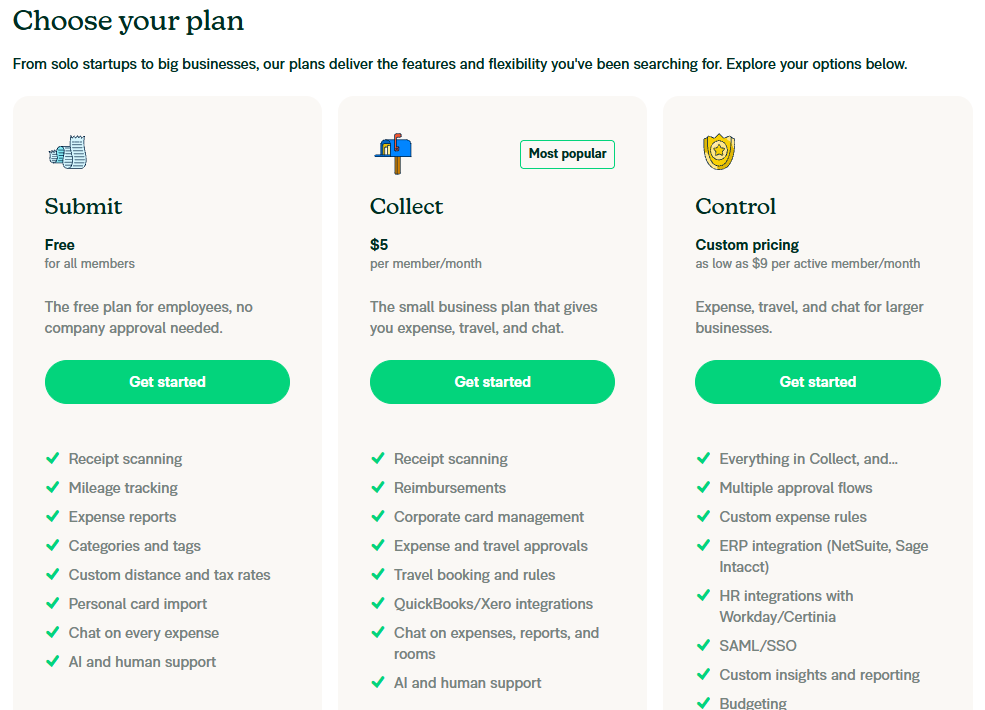
| Expensify | Submit: free. Collect: $5 per member/month. Control: custom, “as low as $9 per active member/month” | Any member; the free Submit plan needs no company approval | Reimbursements and QuickBooks/Xero sync start at Collect; annual and Expensify Card discounts are mentioned but not priced |
| Ramp | Free: $0/user/month. Plus: $15/user/month plus a platform fee by team size; 20% off with annual billing | Card users, by text, Slack, the app, or receipts@ramp.com | US corporation, LLC or LP only; at least $25,000 cash in a linked business account; sole proprietors not accepted |
| Zoho Expense | Free: up to 3 users. Standard: $4/user monthly or $3 annual. Premium: $6 monthly or $5 annual | Each user who files expenses is billed | Scans per user per month: 20 free, 200 Standard, 1,000 Premium; 5 GB receipt storage on Free |
| QuickBooks Online | Simple Start $38, Essentials $85, Plus $140, Advanced $340 per month (list) | QuickBooks users with forwarding permission; employee expense claims point to Advanced | Users per plan: 1, 3, 5, 25; page showed 50% off for 3 months, no end date listed |
Expensify
Expensify’s pricing page splits the free Submit plan, which it describes as “the free plan for employees, no company approval needed,” from Collect at $5 per member per month. Collect is the first tier that lists reimbursements and approvals, along with QuickBooks/Xero integrations. The page says discounts exist for annual commitments and Expensify Card use, but it does not print the discounted rate, so budget on the $5 list price.
Ramp
Ramp’s pricing page lists a $0 Free plan that includes auto-receipt collection and matching plus QuickBooks Online and Xero integrations. The catch is eligibility, set out in Ramp’s qualification page: the business must be a US-registered corporation, LLC, or LP with at least $25,000 in cash in a linked US business bank account. Ramp says it is not accepting sole proprietors. Its receipt matching works on transactions made with Ramp cards, so it fits best when you plan to move spending onto them. The Plus plan’s platform fee is not shown on the page, so its total cost needs a sales quote.
Zoho Expense
Zoho Expense’s pricing page is the most specific about scan limits. The Free plan stops at 3 users and 20 AI receipt scans per user per month; after the limit you can still upload receipts by hand. Standard costs $4 per user on monthly billing or $3 on annual billing and raises the scan limit to 200. The FAQ notes that anyone who creates expenses or reports gets billed, so count submitters, not just admins.
QuickBooks Online
Every plan on the QuickBooks Online pricing page has a check mark for receipt capture. Intuit’s help article on emailing receipts and bills explains the limit: you set up a custom forwarding address, toggle it on for users, and each person must send from the email they use to sign in. The same article says that if you want employees to upload and submit receipts for expense claims, you should consider upgrading to Advanced. For the user limits on each QuickBooks plan next to Xero and Zoho Books, see our QuickBooks vs Xero pricing breakdown for a 5-person team.
A six-person crew, priced four ways
Hypothetical business: a landscaping LLC with the owner and five crew leads. All six buy fuel and parts for job sites, which adds up to about 40 receipts a month across the team. The owner already pays for QuickBooks Online Essentials at the $85 list price. Here is what receipt tracking adds, using only the published figures above.
- Expensify Collect: 6 members × $5 = $30 a month, or $360 a year at list price.
- Zoho Expense Standard: 6 users × $4 = $24 a month on monthly billing ($288 a year), or 6 × $3 = $18 a month on annual billing ($216 a year). The Free plan is out because it caps at 3 users. At roughly 7 receipts per person a month, the 200-scan limit is far away.
- Ramp Free: $0 in software fees, since the business is an LLC, provided it keeps $25,000 in cash and moves crew spending onto Ramp cards. Plus would start at 6 × $15 = $90 a month before the unpublished platform fee, so its full price needs a quote.
- QuickBooks Online: $0 extra if the owner photographs or forwards every receipt personally. If the crew leads submit their own expense claims, Intuit points to Advanced at $340 a month, which is $255 a month more than Essentials, or $3,060 a year at list price.
The spread runs from $0 to $3,060 a year for the same 40 receipts. Three choices drive it: who submits, whether people pay with company cards or their own, and whether the business qualifies for a card program.
One more cost belongs in the math. When crew leads pay out of pocket, Publication 463’s accountable plan rules expect them to account for expenses within 60 days and return any excess advance within 120 days. Reimbursements that meet those rules stay out of box 1 of the employee’s W-2. An app that nags people to submit each week makes the 60-day window easy to hit.
Before adding a separate receipt app, check whether your accounting plan already covers receipt capture; the guide to how much software costs a small business lists what each stage of the stack charges.
Write the receipt rule before you pick the app
A one-paragraph rule tells you which features matter. Decide who submits, how fast, and what memo is required, then match the rule to a plan.
Sole proprietors
Ramp is off the table under its own eligibility terms. For one person, Zoho Expense Free or Expensify’s free Submit plan covers capture, and if you keep books in QuickBooks Online, the receipt capture in your current plan may be enough. Check that the free tier lets you add a category and memo, since that is where the business purpose goes. Expensify’s FAQ says expense categorization needs a paid plan, while its Submit card lists categories and tags, so confirm which applies during the trial.
Staff who pay with personal cards
You need a reimbursement workflow, which points to Expensify Collect or Zoho Expense Standard on price. QuickBooks Online can do it on Advanced. Set the submission deadline well inside the 60-day accountable plan window, such as every Friday.
Teams moving spending onto company cards
Ramp’s Free plan is the published $0 option if you meet the $25,000 cash and entity rules. Expensify and Zoho also list corporate card features on paid plans, so compare those before you open a new card program just for receipts.
One bookkeeper who handles every receipt
Staying inside QuickBooks Online avoids a second subscription and a second sync. The work shifts to that person, so the plan holds up only if receipts reach them within days. Our year-end bookkeeping worked example covers the reconciliation and close steps those receipts feed into, and the small business year-end checklist lays out the rest of the December close in order.
This week, write your rule in three lines: every receipt gets captured regardless of amount, each one carries a memo naming the job or client, and submissions are due within 7 days. Then start a trial of the one app that fits your situation above, send it five real receipts from this month, and export them before the trial ends. If the export opens with images and memos intact, you have found a tool that can meet the IRS’s “retrieve and reproduce” test.
This article is general information about recordkeeping and software pricing, not tax, legal, or accounting advice. Plans and prices change; confirm them on each vendor’s page. For your own records questions, see IRS Publication 583 or ask a tax professional.
Leave a Reply