
QuickBooks vs Xero pricing splits wide once four people on a five-person team need their own login. QuickBooks Online pushes you to its Plus plan at $140 a month, Zoho Books to Professional at $50 (or $40 a month billed annually), and Xero’s three plans run $27 to $97 with no charge per user. Most of that gap comes from one rule. QuickBooks and Zoho Books cap the number of users on each plan, while Xero states it charges no per-user license fees.
The figures below come from the three vendors’ public US pricing pages as they appeared on October 21, 2026. Both QuickBooks and Xero were running introductory promotions that day. Promos change the first-year bill a lot, so regular and promo prices are listed separately. Nothing here ranks one product above the others. Which plan is cheapest for you depends on four questions that come right after the price comparisons.
If you plan to switch at the start of 2027, the small business year end checklist explains why January 1, after the 2026 books are locked, is the cleanest point to move.
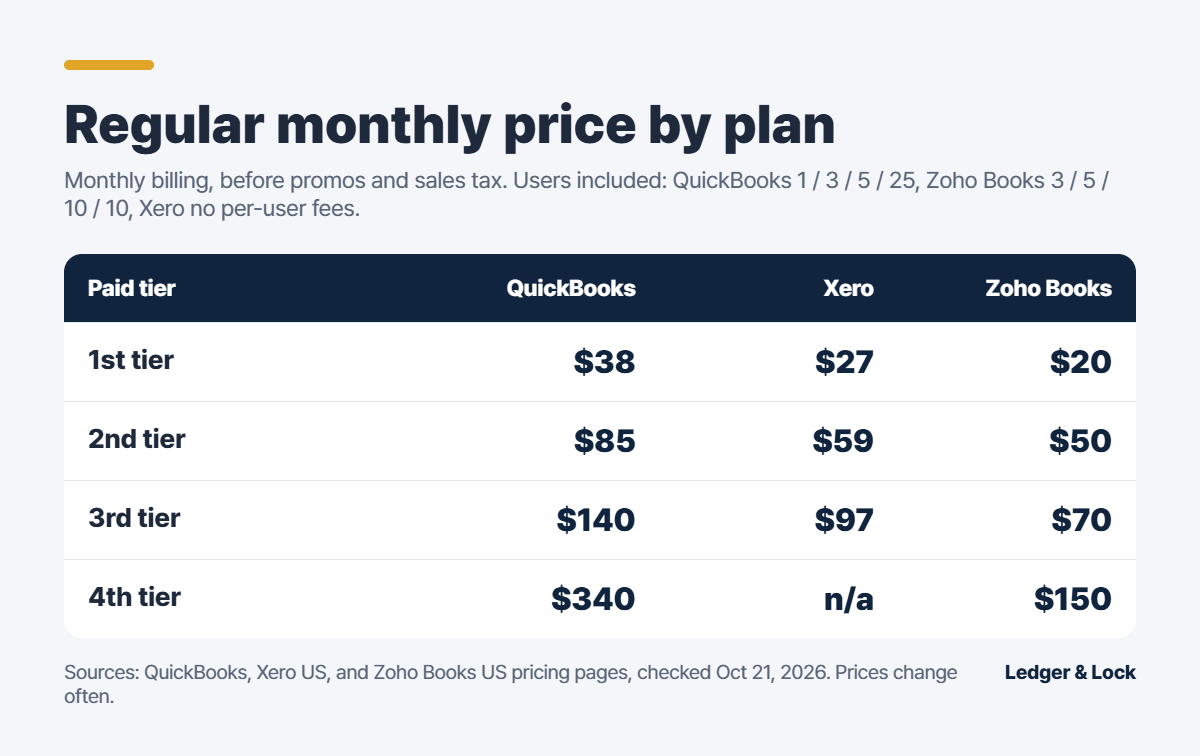
QuickBooks vs Xero pricing side by side, with Zoho Books
This table combines the three QuickBooks Online pricing, Xero US pricing, and Zoho Books US pricing pages. Prices are the regular monthly-billing rates before any promotion, and they exclude sales tax, payroll, and payment processing.
| Plan tier | QuickBooks Online | Xero (US) | Zoho Books (US) |
|---|---|---|---|
| Free option | QuickBooks Free, $0 (no mobile app or third-party integrations) | None listed | Free, $0, 1 user + 1 accountant, revenue under $50K |
| 1st paid tier | Simple Start $38, 1 user | Early $27, 20 invoices and 5 bills | Standard $20 ($15 annual), 3 users |
| 2nd paid tier | Essentials $85, 3 users | Growing $59 | Professional $50 ($40 annual), 5 users |
| 3rd paid tier | Plus $140, 5 users | Established $97 | Premium $70 ($60 annual), 10 users |
| Higher tiers | Advanced $340, 25 users | None listed | Elite $150, Ultimate $275 |
| Project profitability | Plus and up | Established only | Professional and up |
| Inventory | Plus and up | Inventory Plus add-on (Growing, Established) | Professional and up |
| Promo shown Nov 25, 2026 | 70% off for 3 months, offer ends Nov 29, 2026 (50% off on Oct 21) | 90% off for 6 months for new US customers, offer ends Nov 30, 2026 (the Oct 21 offer ended Nov 2) | Lower price for annual billing |
Three details on those pages are easy to miss. QuickBooks lists accountant access separately: 2 accountants on Simple Start through Plus and 3 on Advanced. Xero’s Early plan offers automatic reconciliation as an optional $5 a month add-on, while Growing and Established include it. Extra Zoho Books users cost $3 per user per month, or $2.50 billed annually, so a sixth person does not force a jump to Premium.
Card processing is a separate cost that none of these subscriptions include. If customers pay you online, our Stripe vs Square vs PayPal fees comparison shows what each processor keeps on a $50 card sale and how invoices paid by bank transfer change the math.
Price the plan your third or fourth user forces you into, not the plan on the banner. For a team of five, that one question can triple the monthly bill.
The same trap shows up when you price a CRM, where the feature you need often sits a tier or two above the entry plan. Our walkthrough of CRM cost per month for a 3-person team applies this test to HubSpot, Pipedrive, and Zoho CRM.
Users and limits, vendor by vendor
The user rules explain most of the price differences, so here they are side by side.
- QuickBooks Online ties users to the tier: 1 on Simple Start, 3 on Essentials, 5 on Plus, 25 on Advanced. A two-person business where both partners want a login is already looking at Essentials at $85 a month.
- Xero states “No per-user license fees” on its US pricing page. Its limits are about volume and features instead: the Early plan caps you at 20 invoices and 5 bills, and multi-currency, project time and cost tracking, and employee expense claims are listed as Established only.
- Zoho Books includes 3 users on Standard, 5 on Professional, 10 on Premium and Elite, and 15 on Ultimate. The Free plan is limited to businesses with revenue under $50,000 for the financial year.
Payroll and 1099 tools are priced separately
Payroll is a separate purchase in each case. Xero lists its US payroll, powered by Gusto, as an optional add-on at $36 a month plus $6 per employee or contractor. Payroll from Intuit and from Zoho is sold as a separate product, and this comparison did not price either one. If you file contractor forms, Xero and Zoho Books list W-9 and 1099 tools on their plans, and QuickBooks Advanced lists free 1099 e-filing. Our 1099-NEC prep guide for 2026 payments covers the W-9 side of that work.
Intuit’s payroll plans are priced in the Gusto vs QuickBooks payroll pricing comparison, which puts each plan’s base fee and per-person fee side by side with Gusto’s own tiers.
Four questions that decide which tier you need
Price pages lead with the entry plan, and your business probably won’t fit on it. With the tables above in mind, answer these in writing to find the tier to price for each product:
- How many people need their own login? Count owners, office staff, and anyone who approves bills. Count your outside bookkeeper or CPA separately, because QuickBooks gives accountant seats on top of the user limit.
- How many invoices and bills do you enter per month? Xero’s cheapest plan allows 20 invoices and 5 bills, so a business sending 30 invoices a month skips it.
- Do you need project profitability, inventory, or foreign currencies? These features sit in the upper tiers of all three products, and they move the price more than anything else.
- Will you pay monthly or annually? Annual billing lowers the Zoho Books price, while the other two were advertising introductory discounts on monthly plans.
Write the answers down before you open a free trial. Trials are built to make the tier you are testing feel like the right one.
Worked example: a hypothetical 5-person design studio
Picture a hypothetical interior design studio with five people. Four of them need a login: the owner, the office manager, and two designers who enter time and expenses. An outside bookkeeper also needs access. The studio sends about 35 invoices a month, wants profit per project, carries no inventory, and bills only in US dollars.
- Pick the qualifying tier. QuickBooks: 4 users rules out Essentials (3 users), and project profitability is a Plus feature, so Plus at $140. Xero: 35 invoices rules out Early, and project tracking is Established only, so Established at $97. For Zoho Books, 4 staff plus the bookkeeper makes 5 logins, which fits Professional, the first tier with project profitability.
- Apply the promotion. QuickBooks on Oct 21: 3 months at $70, then 9 months at $140, which is $210 + $1,260 = $1,470 in year one. On Nov 25, 2026 the page showed 70% off for 3 months instead, ending Nov 29: 3 × $42 + 9 × $140 = $126 + $1,260 = $1,386. Xero: 6 months at $9.70, then 6 months at $97, which is $58.20 + $582 = $640.20. The Oct 21 offer ended Nov 2, and on Nov 25 Xero listed the same 90% discount for new US customers through Nov 30, 2026. Without an offer, year one is 12 × $97 = $1,164. The calculator below applies each offer only until its listed end date.
- Pick the billing cycle. Zoho Books Professional costs $40 × 12 = $480 a year on annual billing, or $50 × 12 = $600 paid monthly.
- Look at year two. Promotions end. QuickBooks Plus becomes $1,680 a year, Xero Established $1,164, and Zoho Professional stays at $480 if the annual price holds.
- Test the cheaper fallback. If the studio kept project tracking in a spreadsheet, Xero Growing would do: $35.40 + $354 = $389.40 in year one with the same offer ($708 without it) and $708 after that.
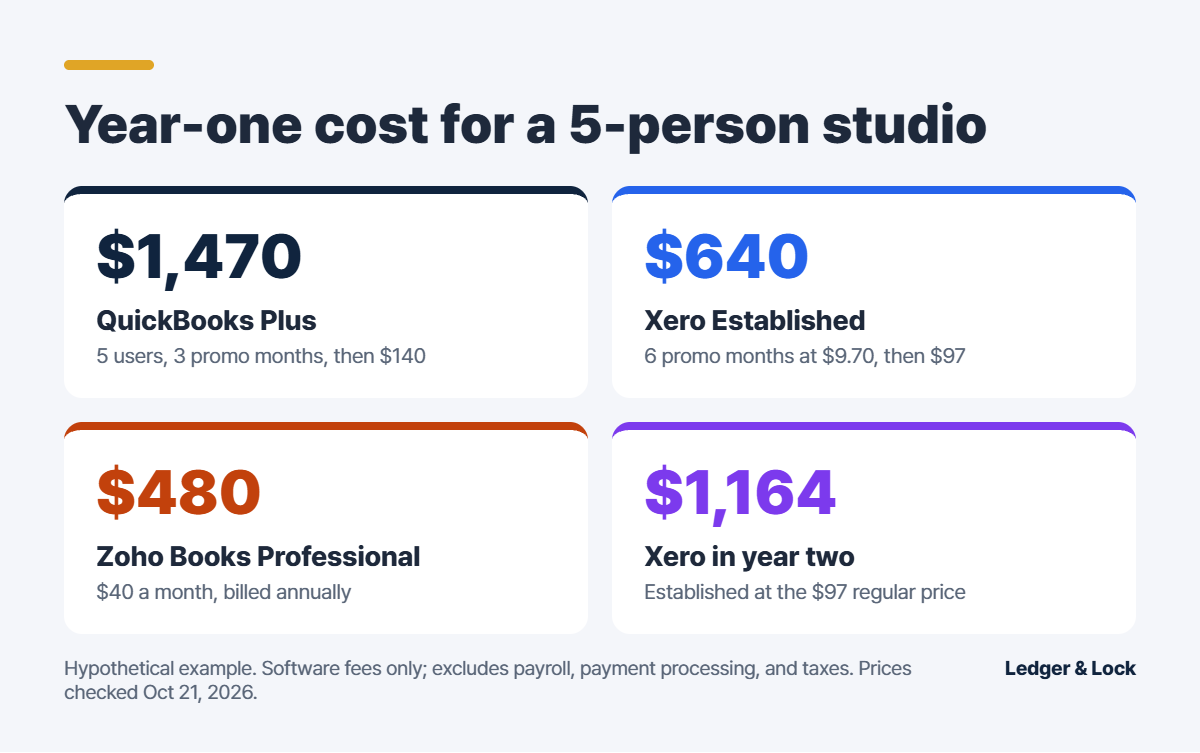
Over two years the spread is $3,150 for QuickBooks with the Oct 21 offer ($3,066 with the 70% offer listed Nov 25), $1,804.20 for Xero (or $2,328 at the regular price once its current offer ends), and $960 for Zoho Books. That does not make the cheapest product the right one. A bookkeeper who already works in QuickBooks may bill fewer hours there, and an hour of their time can cost more than a month of software. Ask your bookkeeper which product they support before you decide on price alone.
If you work alone and mainly send invoices, any of these plans may be more than you need. The FreshBooks vs Wave vs QuickBooks Solopreneur comparison covers the lighter invoicing tools, where payment fees on a busy month usually cost more than the subscription.
Compare year two, not month one. Every promotion in this comparison ends within six months, and the regular price is what you pay for as long as you keep the software.
To find the tier your own team lands on and what it costs over two years, enter your logins and invoice volume below.
Accounting software cost calculator: QuickBooks, Xero, Zoho Books
Answer the questions that decide the tier. The calculator picks the first plan at each vendor that covers your logins, invoice volume and project tracking, then prices year one (with the introductory offers shown on November 25, 2026, applied only until their listed end dates) and year two at the regular price.
Basis: QuickBooks Online pricing, Xero US pricing and Zoho Books US pricing pages as they read on October 21, 2026, rechecked November 25, 2026, in US dollars before sales tax. QuickBooks: Simple Start $38 (1 user), Essentials $85 (3 users), Plus $140 (5 users), Advanced $340 (25 users); accountant access on top of the user limit (2 accountants, 3 on Advanced); project profitability from Plus; promotion on November 25, 2026: 70% off for 3 months, offer ends November 29, 2026 (applied only up to that date). Xero: Early $27 (20 invoices and 5 bills a month), Growing $59, Established $97 (project time and cost tracking); no per-user license fees; promotion on November 25, 2026: 90% off for the first 6 months for new US customers, offer ends 11:59 pm UTC on November 30, 2026 (applied only up to that date). Zoho Books: Standard $20 or $15 billed annually (3 users), Professional $50 or $40 (5 users, project profitability); extra users $3 per user per month, or $2.50 billed annually; an outside bookkeeper counts as a login. Year one with a promotion = discounted months + regular months; after an offer ends, year one = 12 × regular price; year two = 12 × regular price. Not covered: QuickBooks Free and Zoho Books Free (limits beyond logins, such as revenue under $50,000), inventory, multi-currency, Xero’s $5 auto-reconcile add-on on Early, Xero Inventory Plus, payroll, payment processing, sales tax, whether a promotion applies to existing customers, and price changes after that date. Estimate only.
How we checked this calculator
We ran these numbers on Nov 25, 2026. Each hypothetical set was priced by hand from the QuickBooks Online pricing page, the Xero US pricing page and the Zoho Books US pricing page as they read that day, then entered into the calculator above. That check found the promotions had changed since Oct 21 (QuickBooks now 70% off for 3 months until Nov 29, Xero 90% off for 6 months until Nov 30), so the calculator was updated; regular prices had not changed.
| Hypothetical inputs | Two-year total from the published prices | Calculator result |
|---|---|---|
| Set A: 1 login, 10 invoices a month, no bookkeeper, no project tracking | QuickBooks Simple Start $832.20 · Xero Early $502.20 · Zoho Standard $360 (annual) | $832.20 · $502.20 · $360 |
| Set B: 3 logins (Essentials limit), 21 invoices (one over Xero Early), plus a bookkeeper | QuickBooks Essentials $1,861.50 · Xero Growing $1,097.40 · Zoho Standard + 1 extra user $420 | $1,861.50 · $1,097.40 · $420 |
| Set C: 6 logins (one over the Plus limit), 20 invoices, project tracking | QuickBooks Advanced $7,446 · Xero Established $1,804.20 · Zoho Professional + 1 extra user $1,020 | $7,446 · $1,804.20 · $1,020 |
| Worked example above: 4 logins, 35 invoices, bookkeeper, project tracking | QuickBooks Plus $3,066 · Xero Established $1,804.20 · Zoho Professional $960 | $3,066 · $1,804.20 · $960 |
Totals include each offer only for sign-ups before its end date; once the offers end (Nov 29 for QuickBooks, Nov 30 for Xero) the calculator prices year one at 12 regular months (the worked example becomes $3,360, $2,328 and $960). It does not cover payroll, payment processing, add-ons or sales tax, and prices change, so check each page before you buy.
Which plan fits which situation
Hold your answers to the four questions against the rows below. Each row follows the published plan limits; none of it reflects hands-on testing.
| If your business… | Plans to price first | Why |
|---|---|---|
| Has one owner doing the books, revenue under $50K | Zoho Books Free, QuickBooks Free, Xero Early | Free tiers exist on two of the three; Xero Early is $27 if 20 invoices a month is enough |
| Needs 3 to 5 logins, simple invoicing | Xero Growing, Zoho Books Standard or Professional, QuickBooks Essentials or Plus | Xero does not charge per user; Zoho Standard covers 3 users |
| Tracks profit by job or project | QuickBooks Plus, Xero Established, Zoho Books Professional | Project features start at these tiers |
| Holds inventory | QuickBooks Plus, Zoho Books Professional, Xero with Inventory Plus | Inventory is a Plus or Professional feature, or a Xero add-on |
| Bills in other currencies | Xero Established, Zoho Books Professional | Xero lists multi-currency on Established only |
| Works with a bookkeeper who uses one product | That product | Your bookkeeper’s hours can cost more than the price difference |
What the pricing pages leave unconfirmed
What this comparison could not confirm: QuickBooks payroll and Zoho Payroll prices, whether promotions apply to existing customers, and exact feature limits that appear only after signup. Check those on a sales call or in the trial before committing.
Whatever you choose, the software does not change which records you must keep. The IRS recordkeeping page lists the supporting documents a business should hold, and they apply in all three products.
Receipts are where that rule bites most often, because a card statement line shows the amount but not the business purpose. Our receipt tracking app comparison looks at how QuickBooks Online, Expensify, Ramp and Zoho Expense capture receipts and what each costs for a six-person crew.
If you are pricing the rest of the back office too, the small business software cost guide lines up payroll, bill pay, CRM and card fees in the order most owners add them.
What to check during the free trial
A trial is the cheapest time to find out whether the tier you priced really covers your work. Use it on these tasks, in this order:
- Connect your main business checking account and run one month of bank reconciliation. The year-end bookkeeping checklist walks through what a clean reconciliation looks like.
- Invite every person who needs a login, including the bookkeeper, and confirm the plan lets you add them without an upgrade prompt.
- Send one real invoice and record one real bill, then count how many of each you send in a normal month.
- Set up one project or inventory item if you priced the higher tier for that feature.
- Write down the regular price, the promo end date, and the cancellation steps shown at checkout.
Your next step: count the logins you need today, then open the pricing page of each product and find the first tier that covers that count. That is the price to compare.
This article is general information based on vendor pricing pages checked October 21, 2026, and is not accounting, tax, or legal advice. Prices, promotions, and plan features change often; confirm current terms on each vendor’s official pricing page, and see IRS.gov for recordkeeping requirements.
Leave a Reply