
This QR code phishing example starts with a fake benefits email. The safer response is to open your usual HR portal yourself, not scan a code that arrives with an unexpected request to sign in.
Imagine a hypothetical eight-person design studio preparing next year’s employee benefits. An email labeled “Updated Benefits Handbook” arrives with an attachment and asks each person to acknowledge it on a phone. The message sounds relevant, so an employee reaches for the camera. That moment, before the code opens a website, is where a small office needs a clear rule.
The studio is an illustration, not a reported customer incident. The underlying pattern is documented: the University at Buffalo published an HR/payroll QR-code scam alert on September 19, 2023. Its warning and the FTC’s QR guidance were checked on November 12, 2026. This guide follows one suspicious benefits message through verification and response; it does not provide a technical investigation of a compromised device.
A QR code phishing example that borrows the HR calendar
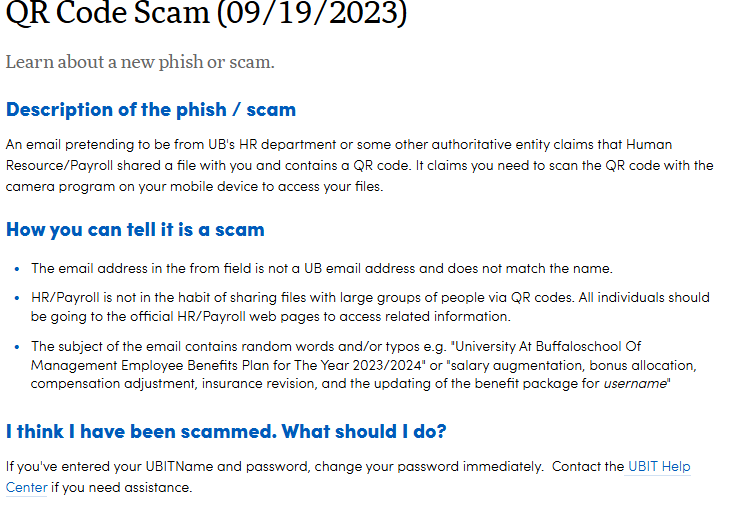
Buffalo’s UBIT alert describes an email pretending to come from HR or another authority. It says HR/payroll shared a file and asks recipients to use the phone camera to scan a QR code. The university identifies a sender address that does not match the name, an unusual way of sharing payroll files, and subject lines containing benefit-plan language or errors.
Those details make a useful office comparison. An unexpected benefits message can sound plausible during enrollment season, while its requested action is unlike the way your employer normally delivers forms. The calendar is context, not proof. A real deadline does not establish that this particular email came from the benefits provider.
In the hypothetical studio, the employee has previously used a saved payroll portal to read benefits documents. The new attachment asks for a phone-only sign-in instead. The owner’s first question should be whether the provider actually sent that request. It should not be which scanner app will make the code feel safer.
A familiar logo does not verify the destination
The FTC’s December 6, 2023 QR-code alert explains that a scam code can take you to a spoofed site that looks real. Information entered there can be stolen. It also warns about malware and messages that invent an account problem or create urgency.
Treat three observations separately: who appears to have sent the message, where the code points, and what the destination asks you to do. A payroll logo answers none of those questions by itself. A website can copy a sign-in screen. A code printed inside a PDF can be as suspicious as one pasted into the email body.
| What you see | What it establishes | What still needs checking |
|---|---|---|
| An HR name and benefits logo | The message claims an HR connection | Confirm the request with HR through a known contact |
| A QR link preview | A destination address is visible | Look for switched letters or misspellings; unexpected codes can be avoided altogether |
| A familiar-looking login page | The page resembles the service | Use the saved portal rather than entering credentials through this route |
This is an original decision table built from Buffalo’s sender-and-workflow warning and the FTC’s destination guidance. It is not a list of guaranteed scam indicators. Some legitimate organizations use QR codes. The question is whether you expected this one and can confirm its purpose independently.
Skip the attachment and take the known route
For an unexpected benefits email, do not scan the attachment to investigate it. The FTC recommends avoiding QR codes in unexpected email or text messages, especially ones demanding immediate action. When a message might be legitimate, contact the organization using a phone number or website you already know is real.
In the studio example, the employee closes the attachment and opens the payroll bookmark used on previous paydays. If the document is not there, the employee asks the office manager using the normal internal channel. The manager calls the benefits contact from the existing contract or portal. The reply address and telephone number inside the suspect email are not used to verify the suspect email.

If your office really does deliver benefits forms with QR codes, make the expected workflow explicit before the next mailing. Name the provider, where the same form can be found in the genuine portal, and who can confirm it. Keep an alternative route available to employees who choose not to scan. A verification question should not cause them to miss an actual enrollment deadline.
Account protection still matters. Phone operating-system updates, strong passwords and multifactor authentication are part of the FTC’s recommendations. They support the verification rule; they do not make an unverified benefits link genuine. For account setup choices, use the separate small-business MFA setup guide.
The response changes after a preview, a login, or a download
Ask the employee what happened without turning the conversation into a blame session. A camera preview that was never opened, a visited webpage, entered credentials, and an installed app are different events. Preserve that distinction in the note to IT. Do not tell someone the phone is definitely infected merely because they pointed a camera at a code.
If a password was entered, Buffalo’s alert says to change it immediately and contact the university help center. In a small business, use the genuine service’s known account route and notify your own IT provider or account administrator. If the password was reused on another service, change that reused password as well. Never change it through the page delivered by the suspicious code.
If a file or app was downloaded, or the employee granted permissions, say so explicitly. The FBI’s July 31, 2025 QR-package warning asks reports to identify applications downloaded and permissions provided. Its alert concerns unsolicited packages, not this benefits-email scenario, but those details show why “I scanned it” is not enough information for the responder.
Keep the original message and note the time, the affected service, and the action taken. Do not circulate an active malicious link in a staff chat as a training sample. Give it to the designated responder using the office’s established reporting process. If money or personal information was exposed, the responder can also help decide whether an FBI IC3 report or identity-theft steps are appropriate.
A stolen mailbox can create a separate payment risk. Have the administrator assess that exposure rather than assuming a password reset closes every consequence. The business email compromise controls for vendor-payment requests cover independent payment verification; this article focuses on the code that led to a sign-in.
Questions employees search after a suspicious code
What is QR code phishing, or quishing?
Quishing is phishing that uses a QR code to send you to an attacker-controlled destination. The FTC’s December 2023 alert describes spoofed sites that steal information entered by the visitor and malicious downloads. An unfamiliar code is a reason to verify the request through a known website or phone number.
Why can QR code phishing be difficult to identify in an email?
The destination is encoded in the image rather than written as a normal web link. A familiar HR label can distract you from the route the code takes. Buffalo’s September 2023 warning tells staff to use official HR/payroll pages instead of scanning a code to retrieve supposed benefits files.
Can a QR code install malware?
A malicious QR destination can lead to malware, according to the FTC’s QR-code alert. That does not mean every camera preview automatically compromises a phone. Tell your IT contact whether you opened a page, downloaded a file, installed an app, or granted permissions so the response matches what actually happened.
What should I do after entering my password on a QR-code page?
Change the password immediately through the genuine account service and contact your IT support. Buffalo gives those instructions to users who entered their university credentials. If you reused the password elsewhere, secure those accounts too. Keep the original email for the person investigating rather than revisiting its link.
Write the benefits-mail rule before the next enrollment notice
Put one sentence in the next internal notice: “If a benefits email asks you to scan an unexpected QR code, use the saved provider portal or ask the office manager through the usual channel.” Add the actual portal location in your private staff instructions and identify the contact who can verify a mailing. Do not invent a public portal address or distribute account details in a blog comment.
Then check one recent legitimate HR message with the person responsible for benefits. Does it offer the same trusted route, and does it explain what employees should expect? That is a practical workflow review, not a phishing test performed on employees without notice. The broader small-business security plan puts account protection and payment verification around this narrow email rule.
No percentage of attacks or promised prevention rate is used here. The official sources establish the scam pattern and safer actions, not a guarantee that a particular filter catches it. If the account has already been used without authorization, involve the service provider or a qualified IT responder before treating the incident as resolved.
General information only, not legal, tax, or professional IT advice. Follow your organization’s incident process and the affected service’s official recovery instructions. A qualified IT provider should assess suspected account compromise or malicious downloads.
Leave a Reply