
A small business cyber security checklist does the most good when you work it in order: first the logins that can reset everything else, then the email and payment paths criminals use to take money, then the backups that decide whether an attack is survivable, and last the legal paperwork and the plan for a bad day. The money side is where the losses pile up. The FBI’s Internet Crime Complaint Center counted $3,046,598,558 in reported business email compromise losses in its 2025 annual report, and that kind of theft runs through a mailbox and a payment approval, the two things the first three steps below cover.
This page is the map for the security guides on Ledger & Lock. Each step says when to do it, what decides the details for your office, one figure from an official source, and which full guide to open next. It is written for businesses of roughly 1 to 50 people with no security staff. Network hardware, cyber insurance applications and sector rules such as HIPAA are outside its scope.
Agency pages and statutes linked here were opened again on Nov. 9, 2026. The newest one is NIST’s small-business guide for one-person firms, published Nov. 2, 2026.
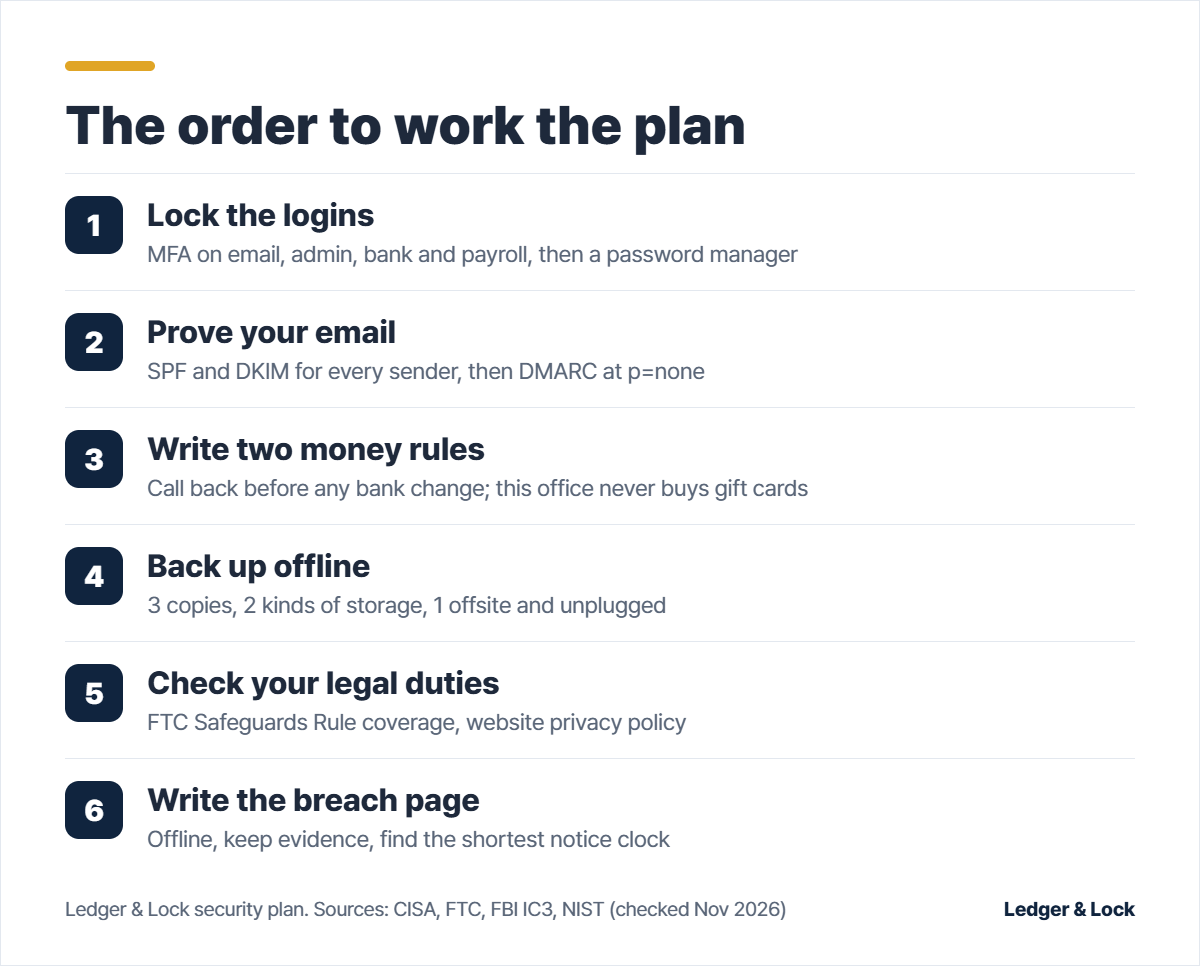
The plan on one page, with an official source for each control
CISA tells small businesses to start with four essentials (phishing training, strong passwords, MFA and software updates), then add logging, backups and encryption. The table below lines up the controls in this plan with the problem each one blocks, a rough effort figure, and the agency page that backs it. The effort column is our own estimate for a 5- to 15-person office on Google Workspace or Microsoft 365. No agency publishes these times, so treat them as planning numbers only.
| Control | What it stops | Rough effort (our estimate) | Official source |
|---|---|---|---|
| MFA on email, admin, bank and payroll logins | Logins with stolen or guessed passwords | An afternoon for admins, about a week to enroll staff | CISA: Require MFA |
| Business password manager | Reused passwords and logins shared by text or spreadsheet | A day to set up, a few weeks to move shared logins | CISA: Use strong passwords |
| SPF, DKIM and DMARC records | Spoofed mail from your domain and invoices sent to spam | An hour of DNS edits, then weeks of DMARC reports at p=none | Google sender guidelines |
| Call-back rule for bank and payment changes | Wire and ACH payments redirected by business email compromise | One written rule and a short staff meeting | FBI IC3 |
| “We never buy gift cards” rule | Texts that impersonate the owner and ask for card codes | One message to every employee | FTC: Gift card scams |
| 3-2-1 backups with an offline copy | Ransomware, deleted folders, dead drives | A weekend, then a restore test each month | CISA #StopRansomware Guide |
| Safeguards Rule check | Missing a required security program or the FTC breach notice | An hour to see if you are covered | 16 CFR Part 314 (FTC) |
| Website privacy policy | A missing or inaccurate policy under California law and FTC rules | Half a day | Cal. Bus. & Prof. Code 22575 |
| One-page breach response plan | Lost evidence and missed notice deadlines | Two hours to write | FTC: Data Breach Response |
Step 1: lock the logins that can reset everything else
Start with the accounts that control other accounts: your email, the Google Workspace or Microsoft 365 admin login, online banking and payroll. An attacker who holds the mailbox can reset nearly every other password you own, so these come before anything else on the list. Give owners and admins passkeys or security keys, put staff on an authenticator app with number matching, and write down how a lost phone gets reset before anyone loses one. Microsoft has reported that MFA can block over 99.9% of account compromise attacks. The rollout order and the lockout fixes are in our guide to setting up MFA for a small business without locking anyone out.
MFA protects the sign-in prompt. A password manager deals with the logins that still travel by text message, sticky note or shared spreadsheet, which is how one leaked password turns into five. Head count decides the plan more than features do, because some business tiers stop at 10 users while others start there, so count the people who will need a seat a year from now. The seat-by-seat password manager comparison sets 1Password, Bitwarden and Keeper side by side as their pricing pages showed them on Nov. 2, 2026, with a worked yearly cost for a seven-person office.
Locked-down logins also have to close when people leave, and January is when most seasonal hires do. The offboarding checklist for seasonal staff puts that in order: list the shared logins, MFA phones and POS PINs a person holds before the last day, then reset passwords and end sessions at the exit hour in Google Workspace or Microsoft 365.
Step 2: make your domain prove its own email
With the mailboxes locked, fix the DNS records that tell Gmail, Yahoo and Outlook which services may send mail as your domain. Google’s sender guidelines require SPF or DKIM from everyone who sends to Gmail accounts, and anyone sending more than 5,000 messages a day to Gmail must meet a stricter list (Google Workspace Admin Help). These records also make it harder for a stranger to send mail that passes as your own address, which matters for Step 3. Before you edit DNS, read how to check SPF, DKIM and DMARC when business emails land in spam; its first fix is reading the headers of one message you already sent.
Expect this step to take a few weeks of calendar time even though the edits take an hour. A DMARC record set to p=none only reports who is mailing as you, so you can find the invoicing tool or newsletter service you forgot before you tighten the policy.
Step 3: put two money rules in writing
Business email compromise needs no malware. It needs one convincing message asking someone to change where money goes, usually a “new bank account” from a vendor or a rush wire from someone posing as the owner. IC3 logged 24,768 BEC complaints in 2025. The FBI’s advice is to verify any change in account number or payment procedure with the person making the request, which in practice means a call to the phone number already on file, never one printed in the email. The full rule, what the controls cost a 14-person company and the first-hour plan if money already left are in how to prevent business email compromise before you wire money.
The second rule protects employees rather than the bookkeeper. A text that looks like it came from the owner asks a staff member to buy gift cards for a client and send photos of the backs. The FTC’s consumer page on the scam is blunt about it:
“Only scammers will tell you to buy a gift card, like a Google Play or Apple Card, and give them the numbers off the back of the card.” FTC, Avoiding and Reporting Gift Card Scams
Tell every employee before it happens that your business never asks anyone to buy gift cards, and that the reply to any such message is a call to the owner’s known number. The office rule that stops the gift card scam from the boss follows a hypothetical nine-person dental office through the scam step by step and covers who pays when the codes were already sent.
The same call-or-check habit covers links hidden in QR codes. Around open enrollment, a fake benefits email may ask staff to scan a code and sign in; the QR code phishing example in a fake benefits email follows one such message and shows why typing the HR portal address yourself is the safer route.
Payroll is the third target. A W-2 phishing email in the owner’s name asks for every employee’s W-2 by reply, and the files are easiest to grab in January, while 2026 Forms W-2 sit finished ahead of their February 1, 2027 due date. The IRS recommends a two-person review for any request like that, and the W-2 phishing email clues your payroll desk should catch lay out the IRS’s sample wording and the report steps if the files already went out.
Shops that take cards on their own website need one more money rule: a person or a bot check stands between a guest and the card form, and failed attempts are capped. How to prevent card testing on your website follows one hypothetical store through a night of scripted $3 charges and prices out the refunds, fees and disputes that follow.

Step 4: back up the files you could not reopen without
Backups come after logins and payments because they do not stop an attack. They decide how bad the following week is. Keep three copies on two kinds of storage with one offsite and offline, and do not count OneDrive or Google Drive sync as a backup, since sync can carry encrypted files into the cloud within minutes. CISA’s #StopRansomware Guide tells organizations to keep offline, encrypted backups because ransomware actors look for reachable backups to delete or encrypt them. The 3-2-1 small business data backup plan includes a worked setup for a four-person surveying firm and the questions to ask a backup vendor.
A backup only counts once you have restored from it. Pick one file that changed at least a week ago, restore it to a different folder, and open it. Put that test on the calendar for the first business day of each month.
The PCs you restore to need security fixes as well. Windows 10 reached end of support on October 14, 2025, and Microsoft prices business Extended Security Updates at $61 per PC for the first year, doubling each year after. The guide to Windows 10 ESU for small business PCs sorts machines into upgrade, replace or pay groups and prices a nine-PC office through October 12, 2027.
Step 5: find out which security and privacy laws reach you
Tax preparers, mortgage brokers, some bookkeepers and car dealers that arrange financing can all be “financial institutions” under the FTC Safeguards Rule without ever feeling like a bank. Covered firms need a written security program, MFA and encryption, and since May 13, 2024 they must notify the FTC no later than 30 days after discovering a breach involving at least 500 consumers (FTC business blog). The exemption for firms with fewer than 5,000 consumers trims paperwork but keeps those duties. Whether the FTC Safeguards Rule applies to your small business walks through three typical firms and where each one lands.
Solo tax preparers have one more document to produce before January. Line 11 of the Form W-12 PTIN renewal asks you to acknowledge that a written information security plan is required by law, and checking the box does not create one. The sample WISP for a sole proprietorship tax office drafts that plan from IRS Publication 5708, clause by clause.
Almost every business with a contact form, newsletter box or checkout needs the second item, a website privacy policy. California’s Online Privacy Protection Act requires a commercial site that collects personal information from California residents to “conspicuously post” one, wherever the business itself is based. What a small business website privacy policy has to include goes through the required lines and shows when the heavier CCPA thresholds start to matter.
Step 6: write the after-breach page before you need it
The last step is one page you hope never to open. It lists who to call, where the backups are, and the first moves. The FTC’s breach guide says to take affected equipment offline immediately but not to turn machines off until forensic experts arrive (FTC, Data Breach Response), a line that is easy to get backwards in a panic. Notice deadlines then depend on whose data left and where those people live; New York, for example, sets a hard limit of 30 days after discovery. What to do after a data breach at your small business lays out the day-one moves and a worked deadline calendar for one hypothetical firm.
CISA asks organizations to review and drill their incident response plans at least once a year. For a small office that can be a 30-minute walk-through: someone reads the page aloud, and everyone checks that the phone numbers and backup locations on it are still right.
A hijacked mailbox needs a different first hour from a data breach: suspend or disable the account, sign out every session, and call the bank if payment instructions went out from it. What to do when business email is hacked lists the forwarding settings, hidden inbox rules and app passwords an attacker can leave behind in Microsoft 365 or Google Workspace.
What owners ask before starting a security plan
What are the four essentials of cybersecurity for a small business?
CISA lists four starting steps for small and mid-sized businesses: teach employees to avoid phishing, require strong passwords, require multifactor authentication, and keep business software updated. Its next level adds logging, backups and encryption. The list is on CISA’s “Secure Your Business” page, checked Nov. 9, 2026.
Is there a cybersecurity guide for a one-person business?
Yes. NIST published CSWP 50, “Small Business Cybersecurity: Non-Employer Firms,” on Nov. 2, 2026. It is written for owners with no employees and explains the NIST Cybersecurity Framework 2.0 in plain language, with notes on what to add as the business grows. It replaces NIST IR 7621 Rev. 1 from 2016.
Do small businesses have to report a cyberattack?
It depends on what was taken and who you are. State breach laws require notice to affected people when certain personal data is exposed, often within 30 days. Firms covered by the FTC Safeguards Rule must also tell the FTC within 30 days if 500 or more consumers are affected. Money lost to fraud should be reported at ic3.gov.
How often should a small business review its security checklist?
At least once a year, and after any big change such as a new payroll system or a staff departure. CISA recommends reviewing and drilling incident response plans annually at a minimum. Backups need a monthly restore test, and the account list should be checked whenever someone leaves.
Your first hour: open the admin console for your email and list every user who still signs in without MFA. That list is Step 1, and the MFA guide above shows the order to fix it.
This page is general information for U.S. small businesses, not legal or professional IT advice. For a covered business or an active incident, start with the FTC’s privacy and security guidance and talk to an attorney or a qualified IT provider.
Leave a Reply