

A four-person candle shop adds a newsletter signup box to its homepage on a Tuesday. By Wednesday it is collecting names and email addresses from shoppers in Sacramento and San Diego, and California law now expects a posted privacy policy, even though the shop is based in Ohio and has no office or staff in California. Most owners find this out when a payment processor, an ad platform, or a customer email asks where the policy is.
This guide covers a privacy policy for a small business website in the United States: which rules actually require one, what the text has to contain, and how to check whether the heavier state laws reach you. It does not cover GDPR for European visitors, health data under HIPAA, or financial-privacy notices for lenders and tax preparers.

Which rules require a privacy policy for a small business website
There is no single federal statute that orders every US website to post a privacy policy. In practice, though, almost every business site that collects an email address ends up needing one, because of three overlapping pressures: a California law with no size floor, the terms of the tools you install, and the Federal Trade Commission’s power over the promises you make.
California’s Online Privacy Protection Act (CalOPPA) is the broad one. Under Business and Professions Code section 22575, the operator of a commercial website that collects personally identifiable information from consumers residing in California must “conspicuously post” a privacy policy. The definition in section 22577 lists a first and last name, a physical address, an email address, and a phone number as personally identifiable information. A contact form is enough. A violation only counts if you fail to post the policy within 30 days of being notified, but that grace period is a warning, not a plan.
Your tools often require it by contract. The Google Analytics Terms of Service (last updated May 15, 2023, checked Oct 23, 2026) say: “You must post a Privacy Policy,” and that policy has to give notice of cookies or similar technology and disclose the use of Google Analytics and how it collects and processes data. Google lets you meet the last part by linking to its page “How Google uses information from sites or apps that use our services”.
The FTC holds you to what you write. The agency’s privacy and security guidance states that if your company makes privacy promises, “either expressly or by implication,” the FTC Act requires you to live up to them. A policy you copied from another site counts as your promise.
Two more rules matter only in specific cases. The California Consumer Privacy Act (CCPA) applies to for-profit businesses that do business in California and meet any one of three thresholds: annual gross revenue of $26,625,000 or more for the prior calendar year (the CPI-adjusted figure effective January 1, 2025), buying, selling, or sharing the personal information of 100,000 or more California residents or households, or earning 50% or more of annual revenue from selling or sharing that information. Texas’s Data Privacy and Security Act generally exempts businesses that are small under the SBA size standards, except that a small business must get consent before selling a consumer’s sensitive data. And if your site is directed to children under 13, or you know you collect their information, COPPA applies; the FTC’s amended rule took effect June 23, 2025, with a compliance deadline of April 22, 2026 for most provisions, according to the Federal Register notice.
If your site has a contact form, a newsletter box, or checkout, and any Californian can reach it, plan on posting a privacy policy. The size thresholds you hear about belong to the CCPA, not to the basic posting rule.
Start with a map of what your own site collects
A privacy policy is a description of your data practices, so the description has to come first. Template generators skip this step, which is how small sites end up with policies that mention features they do not have and miss the ones they do. Work through the site page by page, including pages you rarely visit, like the careers form.
- List every form. Contact, quote request, newsletter, account signup, checkout, booking, job application. Write down each field it asks for.
- List every script and embed. Analytics, ad pixels, chat widgets, embedded video or maps, review widgets, heatmaps. Your theme or site builder settings usually show these; your web developer can export the list.
- Name the vendor that receives each item. Payment processor, email marketing platform, CRM, hosting company, scheduling tool. Still choosing a CRM? Its privacy documentation is part of what you are buying, and our CRM cost breakdown for a 3-person team covers the plan side.
- Mark anything used for advertising. The CCPA’s definition of “sharing” in Civil Code 1798.140 covers giving personal information to a third party for cross-context behavioral advertising, “whether or not for monetary or other valuable consideration.” An ad pixel can put visitors in that bucket.
- Write down where data is kept and for how long. Inbox, spreadsheet, CRM, email platform. No answer yet on how long? Decide now, because a policy with a stated retention period is easier to keep accurate.
Keep this map in a shared document. You will reuse it every time you add a plugin, and it doubles as the starting inventory if a customer ever asks what you hold about them.
What to include, line by line
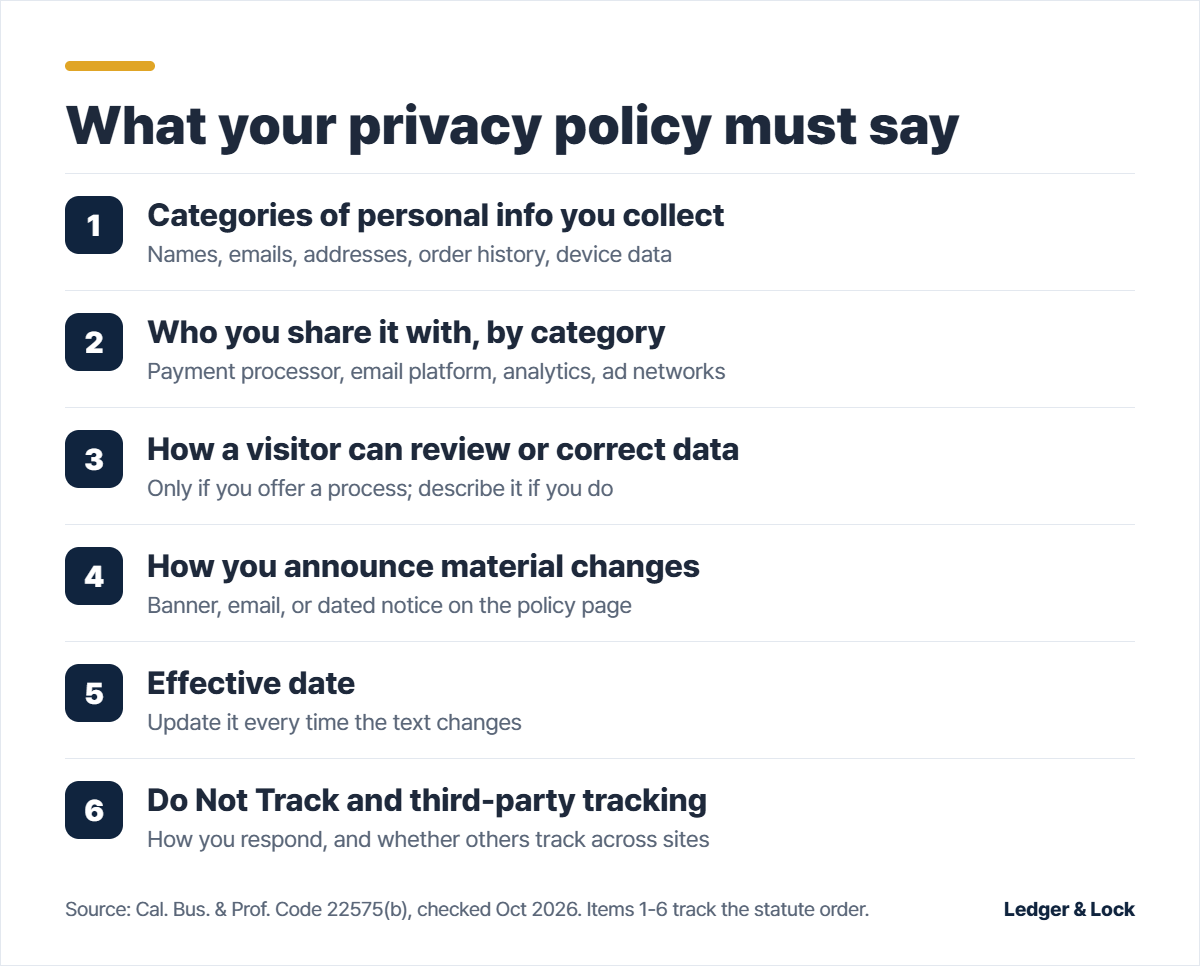
Section 22575(b) lists six things a CalOPPA policy must do. They make a sensible skeleton for any small business policy, because each one answers a question customers and platforms actually ask. Here is the statute text as published on California’s legislative site on Oct 23, 2026:

Turn each item into a short, plain section written from your data map:
- What you collect. Group by category: contact details, order and payment details (note that card numbers go to your processor), device and usage data from analytics, and anything from job applicants.
- Who you share it with. Categories are enough under CalOPPA (“our payment processor,” “our email marketing provider,” “analytics and advertising partners”). Naming vendors is optional but helps readers.
- How someone can review or correct their data. Required only if you maintain such a process. If customers can email you to update their details, say so and give the address.
- How you announce material changes. Pick one method you will actually use, such as a notice on the policy page plus an email to your list for big changes.
- The effective date. Put it at the top and change it with every edit.
- Do Not Track and third-party tracking. Say how your site responds to browser “do not track” signals (many small sites honestly answer that they do not change behavior), and whether other parties, such as ad networks, may collect information about visitors’ activity over time and across sites.
After those six, add a line on how you protect the data and how long you keep it, a contact email, and the Google Analytics disclosure if you use it. If the CCPA or a comparable state law covers you, the required content grows considerably (consumer rights, request methods, opt-out links), and that is the point to bring in a privacy attorney.
Worked example: one small shop checks the thresholds
Take Harbor Lane Candle Co., a hypothetical four-person online shop in Ohio. Its site has a contact form, a newsletter signup, a hosted checkout, Google Analytics, and an ad pixel on product pages. Here is how it would run the numbers, using the CPPA thresholds checked Oct 23, 2026.
| Test | Harbor Lane figure | Threshold | Result |
|---|---|---|---|
| Gross revenue (prior calendar year) | $1,180,000 | $26,625,000 | 4.43% of the line; not met |
| California residents whose data is bought, sold, or shared | Up to 21,400 (analytics users located in California, past 12 months) | 100,000 | 21.4% of the line; not met |
| Share of revenue from selling or sharing data | $0 | 50% | Not met |
| Collects names or emails from Californians (CalOPPA) | Yes, via forms and checkout | No size floor | Policy required |
| Uses Google Analytics | Yes | Contract term | Disclosure required |
The arithmetic: $1,180,000 ÷ $26,625,000 = 4.43%, leaving $25,445,000 of headroom. For the 100,000 test, the shop uses its analytics count of California users as a ceiling, since the ad pixel may make those visitors “shared” data. 21,400 is 21.4% of 100,000; the shop would need about 4.67 times as many California visitors, or 78,600 more, before that test came into play. Analytics “users” are closer to browsers than people, so the true figure is likely lower, which only widens the margin.

So Harbor Lane is outside the CCPA, but it still needs a CalOPPA-style policy and a Google Analytics disclosure. If the shop also sells to Texas residents, it would check its NAICS code against the SBA table to confirm it counts as small there. You can run the same check with your own analytics report and last year’s revenue figure.
Template mistakes that lead to FTC trouble
The FTC case most small businesses should know is old but plain. In 2004, Gateway Learning, the company behind Hooked on Phonics, settled charges that it rented customer names, addresses, and phone numbers after its policy promised it would not, and that it then changed the policy and applied the change to data it had already collected without telling customers. The settlement required it to give up $4,608 it earned from the rentals and barred retroactive material changes without opt-in consent. The dollar figure was small; the precedent was not.
You can rewrite your privacy policy going forward. You cannot rewrite it backward for data you collected under the old promise without getting consent.
The same pattern shows up in small-site policies today, usually by accident:
- “We never share your information with third parties.” False the moment you run an ad pixel or hand orders to a shipping service. Describe the sharing instead.
- A GDPR-only template. It may cite EU legal bases and a data protection officer you do not have, while skipping California’s Do Not Track disclosure.
- Missing the email platform. Newsletter tools receive names and emails and often track opens. For businesses that send marketing email, our guide to SPF, DKIM, and DMARC covers the sending side; the policy should cover the data side.
- An effective date from three redesigns ago. Readers and regulators read a stale date as a sign the text is stale too.
- A policy nobody can find. Section 22577 treats a homepage text link that includes the word “privacy” as conspicuous posting. A footer link labeled “Privacy Policy” on every page meets that easily.
Firms that prepare tax returns, arrange loans, or offer other financial services need more than a website policy. The FTC Safeguards Rule guide explains the written security program those firms need on top of it.
A privacy policy usually describes how you protect the data you collect, so the controls behind it matter too; this cyber security checklist for small businesses covers them from MFA to backups.
Keep the policy accurate after it goes live
The policy is only correct on the day you publish it. Every new plugin, form field, or marketing tool can make one sentence untrue. Tie updates to the moments when your site changes:
- When anyone installs a script, plugin, or embed, they update the data map the same day.
- If the map changes a category of data or a recipient, edit the policy and the effective date.
- For a material change, such as starting to share data for advertising, post a notice and email your list before the change applies, and do not apply it to older data without consent.
- Once a year, open your own site in a private browser window and confirm the footer link works and the policy matches what the site does.
Your next step: open your analytics, note how many users it reports from California over the past 12 months, and pull last year’s gross revenue from your books. With those two numbers and the form list from your data map, you can tell in one sitting whether you need a CalOPPA-level policy or a full CCPA review.
This article is general information, not legal advice. Privacy obligations depend on your industry, location, and data practices. For your specific situation, review the California Privacy Protection Agency FAQ, the FTC privacy and security guidance, and your own state attorney general’s site, or consult a privacy attorney.
Leave a Reply