
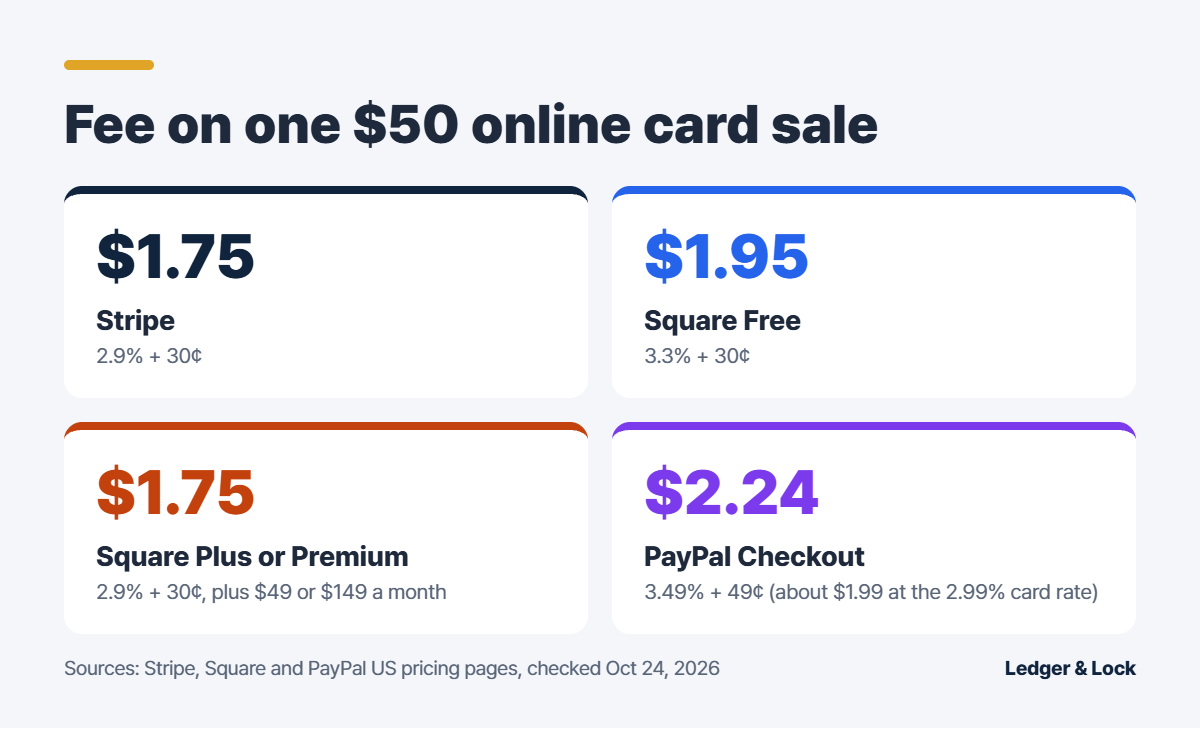
On a $50 online card sale, Stripe keeps $1.75, Square keeps $1.95 on its free plan, and PayPal keeps about $2.24 when the buyer clicks the PayPal button. Those three numbers come straight from each company’s published US rates, checked on October 24, 2026. They are also the least useful part of the Stripe vs Square vs PayPal fees question, because the gap shifts once you add invoices, bank transfers, foreign cards, disputes, or a monthly plan.
This page walks through the fee schedules as a set of if/then choices. Find the situations that describe your business, add up the lines that apply, and you will have a closer estimate than any single headline rate gives you. Card-present hardware, POS software, and negotiated custom pricing are left out; each company quotes those separately.
Counter sales need a separate in-person fee comparison. Selling from a booth on weekends is a different math problem again; the card reader comparison for craft fairs prices Square, SumUp and Shopify POS readers over three December weekends. That side is covered in our Square vs Toast vs Clover cost comparison for a small coffee shop, which runs each vendor’s published POS plans and card rates for a hypothetical shop doing about 3,000 card sales a month.
Stripe vs Square vs PayPal fees at standard rates
The Stripe pricing screen was rechecked on November 12, 2026. Its domestic-card rate remains 2.9% + 30¢, ACH Direct Debit remains 0.8% with a $5 cap, and international cards add 1.5% before any currency-conversion charge. The $50 domestic-card example is $50 × 0.029 + $0.30 = $1.75. Keep that card-processing amount separate from a Stripe Invoicing tool fee or an optional faster payout fee. PayPal’s US fee screen is now dated November 4, 2026. It still shows Checkout at 3.49% plus a fixed fee and standard card payments at 2.99% plus a fixed fee, but now lists an optional Invoice Subscription Service at $14.99 per month. That subscription is separate from payment processing and must be included if you enroll.

Each company prices by payment type, so the same customer can cost you a different amount depending on how they pay. The table pulls the lines a small online seller or service business is most likely to hit, from Stripe’s pricing page, Square’s pricing page, and PayPal’s merchant fee page (which says it was last updated November 4, 2026).
| Fee line | Stripe | Square | PayPal |
|---|---|---|---|
| Online card payment | 2.9% + 30¢ | 3.3% + 30¢ (Free plan); 2.9% + 30¢ (Plus, Premium) | 3.49% + 49¢ PayPal Checkout; 2.99% + 49¢ standard card payments |
| Manually keyed card | +0.5% on top | 3.5% + 15¢ | 3.39% + 49¢ (Virtual Terminal) |
| Bank transfer (ACH) | 0.8%, capped at $5 | 1% via invoice, $1 minimum; $10 cap on Plus and Premium only | 1% via invoice, capped at $10 |
| Invoicing tool fee | 0.4% per paid invoice (Starter), on top of payment fees | None listed | Optional Invoice Subscription Service: $14.99/month |
| International card | +1.5%, plus 1% if currency converts | No separate line on the US pricing page | +1.50% |
| Dispute or chargeback | $15 per dispute, plus $15 if you counter it (refunded if you win) | No dispute fee | $15 standard dispute fee; $20 card chargeback fee |
| Faster payout | Instant Payouts 1.5%, 50¢ minimum | Instant or same-day transfer 1.95% | Instant transfer 1.50%, 50¢ minimum |
| Monthly plan fee | None on standard pricing | $0, $49, or $149 per location | No required monthly plan; optional invoice subscription $14.99 |
Rates as published on the three linked pages on Oct 24, 2026, US accounts. Square’s plan fees are per location per month.
The rate you pay is set by how the customer pays, not by which company you signed up with. A PayPal button checkout and a card typed into PayPal’s card fields are priced differently, and Square’s ACH cap depends on your plan.
Before passing processing costs to customers, check how card networks treat a percentage surcharge and a flat convenience fee differently, and our guide to credit card surcharge vs convenience fee rules walks through what Visa and Mastercard allow.
Stripe vs PayPal fees and Square vs PayPal fees, pair by pair
A merchant with one account already open may only need a two-provider comparison. The pairs below use the same published US rates, checked again on November 3, 2026, applied to a $200 online order and a $1,500 invoice paid by bank transfer.
Stripe vs PayPal fees
On a $200 card order, Stripe’s 2.9% + 30¢ comes to $6.10. PayPal charges $6.47 when the buyer types a card into its standard card fields (2.99% + 49¢) and $7.47 when the buyer clicks the PayPal button (3.49% + 49¢). Both add 1.5% when the card is foreign.
Bank transfers are closer than they look. Stripe’s ACH Direct Debit is 0.8% capped at $5, so the $1,500 invoice costs $5 in processing, but Stripe Invoicing adds 0.4% of the paid invoice ($6), for $11 in total. PayPal’s 1% bank payment hits its $10 cap. If you collect through a Stripe payment link or your own checkout instead of Stripe Invoicing, the $5 cap is the whole charge.
Square vs PayPal fees
Square’s online rate depends on the plan. The same $200 order costs $6.90 on Square Free (3.3% + 30¢) and $6.10 on Plus or Premium (2.9% + 30¢), against PayPal’s $6.47 for a card and $7.47 through its button. For a card you type in by hand, Square’s 3.5% + 15¢ is $7.15 and PayPal’s Virtual Terminal rate of 3.39% + 49¢ is $7.27.
Invoices paid by bank transfer cost 1% at both, and the cap decides the winner. The free Square plan applies a $1 minimum without a cap, so the $1,500 invoice costs $15. PayPal, Square Plus, and Square Premium all stop at $10. Disputes and instant payouts follow different rules again; the chargeback and payout sections below cover them.
If most of your sales are small online orders
For a shop that sells $30 to $80 items through a website, the fixed cents make up a noticeable share of every fee. On a $50 order, Stripe and the paid Square plans both charge $1.75 (2.9% of $50 is $1.45, plus 30¢). A 3.3% rate makes the free Square plan charge $1.95. PayPal Checkout comes to about $2.24 (3.49% of $50 is $1.745, plus 49¢), and a card payment that PayPal prices at its standard 2.99% rate comes to about $1.99.
The Square Free versus Square Plus question is a simple break-even. Plus costs $49 a month per location and lowers the online rate by 0.4 percentage points. $49 divided by 0.004 is $12,250, so a seller with less than about $12,250 a month in online card sales pays more on Plus than on Free, counting the online rate alone. Plus also lowers the in-person rate and adds a $10 cap on invoice ACH payments, so mixed businesses should add those savings before deciding.
PayPal’s higher button rate buys something specific: shoppers who already have PayPal accounts can pay without typing a card number. Whether that lifts your sales enough to cover the extra 0.59 points and 19 cents per order compared with Stripe’s card rate is something only your own checkout data can show. If you offer both a card form and a PayPal button, the blended rate depends on how many buyers pick each one.

If you bill clients with invoices
Invoices change the math because the amounts are larger and the customer can often pay by bank transfer. Take a hypothetical $2,000 invoice:
- Paid by card: Stripe charges $58.30 in card processing plus $8.00 for Stripe Invoicing Starter, $66.30 in total. Stripe states that Invoicing pricing is added to its payments pricing. Square Free charges the same $66.30 (3.3% plus 30¢), and Square Plus charges $58.30. PayPal charges $60.29 for a standard card payment and $70.29 if the client pays through PayPal Checkout.
- Paid by ACH bank transfer: Stripe charges $5.00 (0.8% would be $16, but the cap is $5) plus the same $8.00 Invoicing fee, $13.00 in total. Square Free charges $20.00 because its 1% invoice ACH fee has no cap on the free plan. Square Plus and PayPal both stop at $10.00.
The difference between card and bank transfer on that one invoice is $46 to $60, depending on the provider. That gap is the reason to list bank transfer first on the invoice and keep cards as the fallback for clients who insist. Invoices created in accounting software use that software’s payment add-on rate; our QuickBooks vs Xero pricing comparison covers the subscription side of that choice.
That covers money coming in. For the other direction, paying your own suppliers and subcontractors by ACH or check, the Melio vs Bill.com vs QuickBooks Bill Pay comparison prices a month of vendor payments for a hypothetical six-person HVAC shop.
Freelancers who mostly need the invoice itself, rather than a full accounting plan, can price the lighter tools too: our FreshBooks vs Wave vs QuickBooks Solopreneur invoicing comparison puts each plan’s price next to its card and bank-transfer fees for one sample month.
If some buyers pay with foreign cards
Stripe adds 1.5% for international cards and another 1% if the payment needs currency conversion. PayPal adds 1.50% to its domestic rate for international commercial transactions, and its fee page also lists currency conversion spreads separately. On a $50 order from a buyer with a non-US card, Stripe’s charge rises from $1.75 to $2.50, and PayPal Checkout’s rises from about $2.24 to about $2.99, before any conversion cost.
Square’s US pricing page, as checked on October 24, 2026, shows no separate international-card line. That is not the same as a written promise, so if overseas buyers are a meaningful share of your orders, ask Square support to confirm the rate for your account before you rely on it.
If chargebacks come with your line of work
If disputes show up in most months, look closely at this row, because the three fee policies differ more here than anywhere else. Stripe charges $15 when a dispute arrives and another $15 if you counter it manually, and it returns the second $15 only if you win. Square’s dispute help article says there are no fees for dispute management on chargebacks. PayPal lists a $15 standard dispute fee for transactions paid through a PayPal account or checkout, a $30 “high volume” dispute fee whose conditions are set out in its User Agreement, and a $20 chargeback fee for card transactions that did not go through a PayPal account.
Five disputes a month would cost $75 to $150 in Stripe fees (depending on how many you counter and lose) and $75 to $100 on PayPal at the standard rates (depending on the dispute type), compared with nothing in fees on Square. In each case you also lose the sale amount if the bank rules for the cardholder. The response process is the bigger lever; our guide on how to respond to a chargeback on Stripe, Square, or PayPal covers the evidence each one asks for.
If you need the money before the next business day
Standard payouts cost nothing on all three. Square’s transfer options article says payments taken before 5 PM PT arrive the next business day. Paying for speed costs 1.5% at Stripe (50¢ minimum), 1.95% at Square for instant or same-day transfers, and 1.50% at PayPal for an instant transfer (50¢ minimum).
Federal Reserve holidays stretch that next business day. Square card sales taken on Wednesday, November 25, for example, arrive on Friday, November 27, because Thanksgiving sits in between; the ACH bank holidays 2026 calendar lists each remaining closure and the payout dates it moves.
Transferring a $1,000 balance costs $15.00, $19.50, or $15.00. A business that pays for instant transfers every day on $1,000 would spend roughly $300 to $400 a month across 20 business days, which is more than the processing fee gap in most of the scenarios above. If cash timing is tight, compare that number with the cost of a short line of credit before making instant payouts a habit.
One month of fees for a hypothetical print studio
Juniper Print Studio is a made-up two-person shop. In a typical month it sells 120 prints online at $50 each ($6,000) and bills four corporate clients $2,000 each by invoice, all paid by ACH ($8,000). There are no foreign cards, no disputes, no instant payouts, and no optional PayPal Invoice Subscription Service that month. Using the published rates:
| Setup | Online orders (120 × $50) | Invoices (4 × $2,000 by ACH) | Plan fee | Monthly total |
|---|---|---|---|---|
| Stripe (Invoicing Starter) | $210.00 | $52.00 | $0 | $262.00 |
| Square Free | $234.00 | $80.00 | $0 | $314.00 |
| Square Plus | $210.00 | $40.00 | $49 | $299.00 |
| PayPal, all buyers use PayPal Checkout | $268.20 | $40.00 | $0 | $308.20 |
| PayPal, all buyers pay by standard card | $238.20 | $40.00 | $0 | $278.20 |
The monthly spread for these $14,000 sales between the cheapest and most expensive setup is $52, or about $624 a year. Stripe comes out lowest for this mix because its ACH cap is $5. Square Plus beats Square Free by $15 even though the studio’s online sales are below the $12,250 break-even, because the $10 ACH cap saves $40 on the invoices. Change the mix and the totals move a lot. If the four clients paid by card instead, the month would cost $475.20 on Stripe, $479.36 on PayPal with standard card payments, $492.20 on Square Plus, $499.20 on Square Free, and $549.36 if every buyer and client used PayPal Checkout. For Juniper, getting clients onto bank transfer matters more than which processor it picks.
PayPal figures here use the published percentages before per-transaction rounding, so a real statement can differ by a few cents. Remember too that the PayPal rows are the two ends of a range; most real checkouts mix both payment types.
Processing fees can outgrow every subscription a small business pays. A stage-by-stage software cost breakdown works through a hypothetical 3-person team where exactly that happens.
Before you move your payments to a new processor
Switching processors has costs that do not appear on any of these fee pages: updating the checkout on your website, re-sending saved invoices, and training whoever handles refunds. Before you switch, pull three months of statements from your current processor and sort the transactions into the rows of the comparison table above. Then:
- Count orders by payment type (button, card form, keyed, ACH) so you can apply the correct rate to each.
- Note how many disputes you received and how many you contested.
- Add up any instant payout fees you paid.
- Export the fee detail as a CSV before closing the old account, since the old dashboard may become harder to reach later.
- Book processing fees as their own expense line rather than netting them against sales, so deposits reconcile with gross sales in your year-end bookkeeping.
If the monthly saving on the new provider is smaller than what an hour or two of your time is worth, the setup work will likely eat it. Start by opening your last statement and counting this month’s ACH-eligible invoices; that single number decides most of the comparison for service businesses.
This article is general information about published fee schedules, not financial, tax, or legal advice. Rates, caps, and plan terms change, and negotiated or custom pricing can differ. Confirm current terms on each provider’s official pricing page before you sign up or switch.
Leave a Reply