

Ticking the WISP box on your PTIN renewal does not create a plan. A sample WISP for a sole proprietorship tax office can be short, but it has to exist in writing, name who runs it, and match how you actually handle client files.
That box sits on line 11 of Form W-12, and renewals for 2027 are open now. Below is one hypothetical one-preparer office writing its plan from the IRS template, clause by clause, with the parts of the FTC rule a small office can leave out and the parts it cannot.
What line 11 of the PTIN renewal actually asks
The Instructions for Form W-12 (revised October 2026) say to check line 11 “to acknowledge awareness that paid tax return preparers are required by law to create and maintain a written information security plan to protect taxpayer information.” It is an awareness statement. Nobody asks you to upload the plan, and renewing does not prove you have one.
Renewal itself is quick. The PTIN requirements page says 2027 applications and renewals are being processed, the fee is $18.75, and you need a valid 2027 PTIN before you prepare a return for pay. PTINs run by calendar year, so the one you hold now ends on December 31.
The legal duty behind the box comes from the FTC Safeguards Rule. IRS Publication 5708 states that tax and accounting professionals are financial institutions under that rule “regardless of size,” and that a WISP must be “written and accessible.” Our earlier guide on whether the FTC Safeguards Rule applies to your business covers who is in scope. This one assumes you are, and gets to the writing.
Checking the line 11 box says you know the rule. The written plan is a separate document, and it is the one that has to exist before anything goes wrong.
Sample WISP for a sole proprietorship, written for one office
Meet Larkspur Tax Service, a hypothetical sole proprietorship. The owner, Dana, prepares about 340 individual returns a season from a two-room office. One seasonal assistant scans documents from January 15 to April 15. Client files live in desktop tax software, a cloud document portal, a locked filing cabinet, and Dana’s phone, which gets client email.
Publication 5708 runs 28 pages, and most of that is a template written for a firm with staff, a network and an IT provider. Its own guidance says “a sole practitioner can use a more abbreviated and simplified plan than a 10-partner accounting firm.” So Dana keeps the template’s headings and rewrites each section to fit her office. The clauses below are written for this example; adapt them, don’t paste them.
Who is responsible
The template asks for a Data Security Coordinator and a Public Information Officer, and notes that in firms with two or more practitioners these should be different people. In a one-person office both jobs fall to the owner, and the plan should say so plainly.
Sample clause: Dana [last name], owner, is the Qualified Individual and Data Security Coordinator for Larkspur Tax Service, and is the only person who speaks for the firm to clients, police, the IRS or the press about a security incident.
What data the office holds, and where
Pub 5708 defines the protected information as a client’s name combined with items like a Social Security number, income and tax filing data, or bank account numbers. Its Attachment E is a hardware list: each device, where it sits, and what client data touches it. Dana’s list has five lines, and the phone is the one owners forget.
Dana’s wording: Client information is kept only in: (1) the office desktop running the tax software, (2) the client portal, (3) the locked cabinet in the back room, (4) the encrypted backup drive kept off site, and (5) the owner’s phone, for client email only. No client data is stored on the assistant’s personal devices.
How a client file is exchanged
The template’s electronic exchange policy bans unencrypted email of client data and says passwords go by a different route than the file, for example a phone call or text. This is the clause worth writing in the words your clients will hear.
Plan text: Returns and source documents go to clients only through the portal. If a client cannot use it, the file is sent as an encrypted PDF and the password is given by phone, never in the same email.
The seasonal assistant
Pub 5708 says terminated workers’ logins are disabled at the time they leave and that keys and access codes are returned. A seasonal hire leaves every April, which makes this a yearly event for a small office. The plan should tie it to a date. Our offboarding IT checklist for seasonal staff walks through the account side.
Clause as written: The assistant gets a separate login to the tax software and portal, with MFA, on the first day of work. Both logins are disabled and the office key is collected on the last day of the season, and the owner records the date on Attachment F.
Which Safeguards Rule duties a small office can skip
Under 16 CFR 314.6, four parts of the rule do not apply to a financial institution that keeps customer information on fewer than 5,000 consumers: the written risk assessment, continuous monitoring or annual penetration testing with twice-yearly vulnerability scans, the written incident response plan, and the Qualified Individual’s annual written report.
Count before you rely on that. The test is about information you maintain, so files you still keep for former clients count too. Here is Dana’s count, done generously by counting every person named in a file:
| Group in the files | Returns or households | People counted |
|---|---|---|
| 2026 joint returns | 210 | 420 |
| 2026 single returns | 130 | 130 |
| Dependents named on 2026 returns | 180 | |
| Former clients with files kept from 2020 to 2025 | 260 households | 420 |
| Total | 1,150 |
At 1,150 people, Larkspur Tax Service is far below 5,000 even with generous counting. A busier office with 1,500 returns a year and seven years of files kept could cross the line, so redo the count each fall.
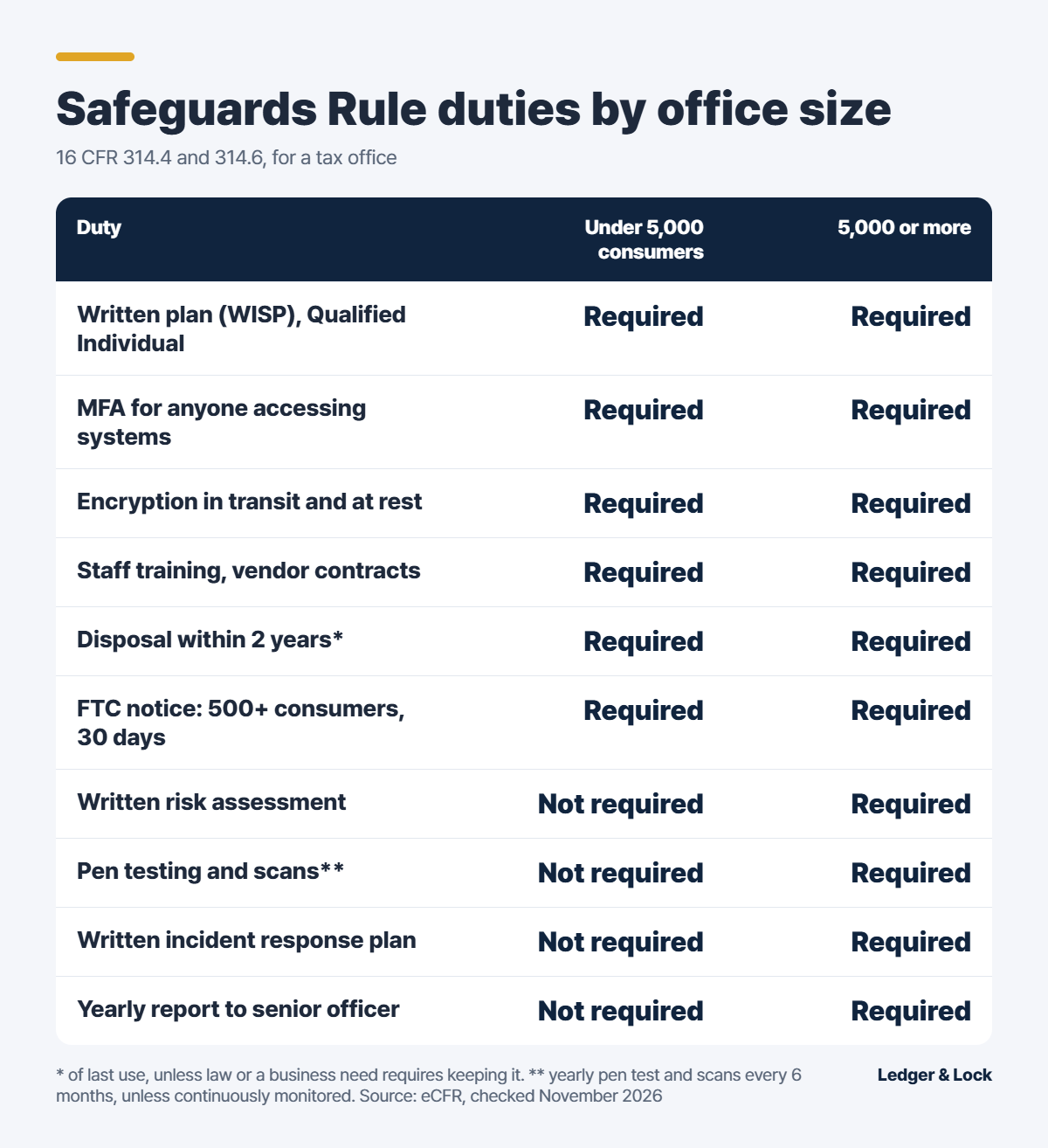
The exemption is narrower than many owners assume. Everything else in 16 CFR 314.4 still applies at any size, including MFA “for any individual accessing any information system,” encryption of customer information in transit over external networks and at rest, security awareness training, contracts requiring service providers to keep safeguards, and disposal of customer information no later than two years after it was last used, unless the law or a legitimate business need requires keeping it longer.
Clauses that small offices tend to leave vague
A plan full of phrases like “access is managed” will not help on a bad day. Three areas in the template tend to be copied without being filled in.
Multi-factor authentication. The template’s sample wording says the firm uses MFA for remote login. The rule itself reaches further: any individual accessing any information system, unless the Qualified Individual approves an equivalent control in writing. Dana’s clause names each account that gets MFA: tax software, portal, email, cloud backup and the bank account used for fees. Our MFA setup guide shows the order that avoids locking yourself out.
Service providers. The template exempts tax software vendors and e-file transmitters, which already follow stricter IRS rules under Publication 1345. Everyone else with access, such as the portal company, an IT helper or a shredding service, needs a contract requiring safeguards. Dana’s clause lists them by name with the date each contract was checked.
Retention and disposal. The rule’s two-year disposal default yields to records you must keep by law or for legitimate business reasons. The template points to Attachment A for your own retention schedule. Write the actual periods there, and say how paper is destroyed (the template suggests shredding) and how old drives are wiped before they leave the office.
Draft wording: Client paper files are shredded on site after the retention period in Attachment A. Retired computers and drives are wiped or physically destroyed before disposal, and the owner records the serial number and date.
The breach page to keep on paper
An office under 5,000 consumers does not need the full written incident response plan in 314.4(h). It still needs to know whom to call, and that list is useless if it sits on the computer that was just compromised. Print it and keep it in the cabinet. This is the same after-breach page that Step 6 of our small business cyber security checklist asks every business to write.
The IRS data theft page for tax professionals lists the first calls. Report client data theft to your local IRS Stakeholder Liaison, who notifies IRS Criminal Investigation; the page says that if you report quickly, the IRS can take steps to block fraudulent returns filed with your clients’ information. It also lists your local FBI office, local police, state tax agencies through the Federation of Tax Administrators, your state attorney general where required, your insurer, and a security expert.

The FTC notice has its own threshold. If an event involves the information of at least 500 consumers, you must notify the FTC as soon as possible and no later than 30 days after discovery, using the FTC Safeguards Rule reporting form. Discovery counts from the first day anyone at the firm other than the attacker knows. Our guide on what to do after a data breach covers client letters and the rest of the response.
What solo preparers ask before writing a WISP
Does a sole proprietor tax preparer need a WISP?
Yes. IRS Publication 5708 says tax and accounting professionals are financial institutions under the FTC Safeguards Rule regardless of size, and a written plan is required. The same publication says a sole practitioner can use a more abbreviated and simplified plan than a 10-partner firm, so short is acceptable as long as it is written.
Is there a free IRS WISP template?
Yes. Publication 5708, Creating a Written Information Security Plan for Your Tax & Accounting Practice, is a free PDF on IRS.gov with a sample template and attachments for retention, rules of conduct, breach steps, staff acknowledgment, hardware inventory and authorized users. Revision 8-2024 is the current version linked from the IRS WISP page.
Do I have to send my WISP to the IRS?
No. Line 11 of Form W-12 only asks you to acknowledge that paid preparers must create and maintain a written plan, according to the October 2026 instructions. Keep the plan in a readable format such as PDF or Word, as Publication 5708 suggests, and store a copy off site or in the cloud.
How often should a WISP be updated?
At least once a year. The Publication 5708 template has a “Last Modified/Reviewed” line with the note to review and update at least annually, and the FTC rule also calls for adjusting the program after material changes to your operations, such as a new portal, new hire or new office.
Before you renew the PTIN, print pages 5 through 12 of Publication 5708, cross out what your office does not do, and fill in names, devices and dates as Dana did above. Then sign and date the implementation clause, and put next November’s review on the calendar.
Rules and figures quoted from IRS Publication 5708 (Rev. 8-2024), the Instructions for Form W-12 (Rev. October 2026), the IRS PTIN and data theft pages, IRS Tax Tip 2026-49, and 16 CFR 314.4 and 314.6 on eCFR, all checked November 19, 2026 (ET). Larkspur Tax Service is a hypothetical office and its numbers are illustrative.
This article is general information, not legal, tax or professional IT advice. State data breach and privacy laws, Massachusetts’ own WISP rule, and Circular 230 duties are not covered. For your office, read IRS Publication 4557 and the full Safeguards Rule, and consider a security professional or attorney.
Leave a Reply