
To prevent card testing on your website, put a bot check in front of the payment step, cap repeat attempts, and refund any test charge that slips through.
Those three moves sound simple until a script hits your checkout at one in the morning. Below is one made-up shop’s bad night, told hour by hour, with the control that would have cut it short at each point. Every setting and fee in it comes from Stripe, Visa and WooCommerce documentation checked on November 21, 2026.
What card testing is, and why a small checkout gets picked
Card testing means someone holding a batch of stolen card numbers runs them through a real store to learn which ones still work. Stripe’s card testing guide lists other names for it: carding, account testing, enumeration and card checking. A card that goes through on a $3 purchase gets resold or used for bigger fraud elsewhere, so the attacker has no interest in your product at all.
Small stores get picked because they are easy, not because they are rich. A guest checkout, a cheap item and no human check before the card form let a script fire hundreds of attempts an hour. Visa’s merchant guidance on enumeration (June 2026) singles out donation pages and “pay what you want” amounts as favorite targets, since the attacker can pick a tiny charge the cardholder is unlikely to notice.
It is also getting more common. In a report released November 17, 2026, Visa said global payment account enumeration volume rose 35% year over year in the first half of 2026. A burst of small orders is also harder to spot in a busy holiday week, which is why the week before Cyber Monday (November 30 this year) is a sensible time to check your own setup.
1:10 a.m. Friday: the first wave hits a $3 sample bar
Meet Hollow Pine Soap, a hypothetical two-person shop on WooCommerce with a Stripe card form built into its own checkout page. Its cheapest item is a $3 sample bar. Guest checkout is on, and there is no CAPTCHA, because the owners worried it would scare off holiday buyers.
At 1:10 a.m. a script starts placing orders for that sample bar. Each order uses a different card number, a random name and an email like “kq81x@” at a free mail domain. Most cards are declined within a second. Nobody is awake, and no alert fires, because the shop never set one up.
Card testers want your checkout, not your products. The cheapest item with the fewest hurdles in front of it is the one they aim at.
What would have stopped it here: a CAPTCHA or similar bot challenge that runs on the server side for every payment request. Stripe’s guide says a CAPTCHA has to validate “all requests that enable card validations or payments,” and to confirm the check is implemented on the server side. The WooCommerce card testing guide names reCAPTCHA plugins and Cloudflare Turnstile as common ways to add one.
3:00 a.m.: what the dashboards show while the owners sleep
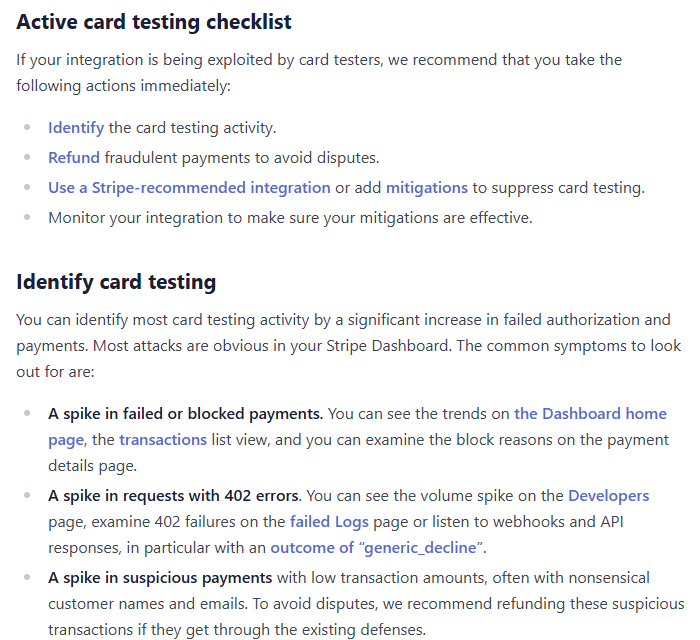
By three o’clock the script has tried about 1,100 cards. If anyone had looked, the signs were plain. Stripe’s documentation lists three symptoms: a spike in failed or blocked payments, a spike in API requests returning 402 errors (often with the outcome “generic_decline”), and a run of low-value payments with nonsense names and emails.
On the WooCommerce side the same night shows up as a wall of orders in Failed status, each with order notes about a declined card. WooCommerce’s own guide points out that these failed orders are not lost sales and do not mean your checkout is broken for real buyers. They are the attack itself.
What would have stopped it here: a rate limit. Stripe suggests capping things such as how many customers one IP address can create in a day, and Visa’s guidance gives “five authorizations from one IP address or PAN within a set timeframe” as the kind of pattern a control should catch. A simple alert on failed orders per hour would at least have woken someone up.
8:15 a.m.: the cleanup and what the night cost
One owner opens the laptop and finds 1,600 checkout attempts since 1:10. Of those, 1,560 were declined and 40 went through at $3 each. That is a 97.5% decline rate on a store that normally sees a handful of failures a day, and Stripe warns that a high decline rate can make issuers treat even your real customers’ payments as riskier for a while after the attack ends.
Here is the math on the 40 approved charges, using Stripe’s standard US pricing of 2.9% plus 30 cents per successful domestic card payment:
| Item | Hollow Pine Soap (hypothetical) |
|---|---|
| Approved test charges | 40 at $3.00 = $120.00 |
| Processing fee per charge | $3.00 × 2.9% + $0.30 = $0.387 |
| Fees on 40 charges | $15.48, not returned on refund |
| Refund all 40 the same morning | Cost of the night: about $15.48 plus staff time |
| Ignore them and 10 become disputes | 10 × $15 dispute fee = $150, plus the $30 charged back and the fees |
Stripe’s refund documentation confirms that processing fees from the original payment are not returned when you refund, and its pricing page lists a $15 fee for each dispute received. Declined attempts cost nothing extra on standard pricing because the fee applies only to successful payments; businesses on custom pricing plans may pay authorization fees, which Stripe names as one of the costs of card testing.
So the owners refund all 40 charges right away. Both Stripe and WooCommerce put refunding at the top of their response steps, because a cardholder who sees a strange $3 charge will often file a dispute, and each dispute adds a fee and a mark against the account. Stripe also warns that heavy dispute or fraud-warning volume can put a business into card network monitoring programs. Disputes that already arrived need a written response, and our guide to responding to a chargeback on Stripe, Square or PayPal walks through that process.
What would have stopped it at each hour
Putting the night back together, each stage had a control that either blocks the script or shrinks the damage. Sources are the Stripe card testing guide, Visa’s June 2026 enumeration guidance and the WooCommerce documentation, all checked November 21, 2026.
| Time | What happened | Control that fits | Named in |
|---|---|---|---|
| Before 1:10 a.m. | $3 item open to guest checkout | Raise the lowest price or hide sample items; require login for cheap items | Visa (minimum amount), WooCommerce, Stripe |
| 1:10 a.m. | Script submits card form freely | Server-side CAPTCHA on every payment request | Stripe, WooCommerce, Visa |
| 1:10 to 3:00 a.m. | Hundreds of tries from a few sources | Rate limits per IP address, card or email | Stripe, Visa |
| 3:00 a.m. | Failed orders pile up unseen | Alert on failed payments per hour | Stripe (Dashboard, webhooks) |
| 8:15 a.m. | 40 charges went through | Refund quickly; review fraud rules with the processor | Stripe, WooCommerce |
| After | Script may return | Rotate API keys if attacks hit the API directly | Visa, Stripe |
Visa’s guidance also recommends requiring the card security code (CVV2) and address verification on card-not-present payments, since it “significantly increases the cost and complexity” of brute-force guessing. Mastercard’s merchant explainer adds 3-D Secure to the list while noting that each extra step adds friction for real buyers, so turn them on where your processor allows and watch your conversion rate afterward.
How to prevent card testing on your website before Cyber Monday
You do not need to be a developer to check most of this, but some fixes live in code. Stripe’s guide says plainly that if you use a plugin or platform, stopping card testing “typically requires code-level changes,” and suggests showing the documentation to whoever built your checkout. With that in mind, these are the places to look this week.
Stores taking cards through Stripe
Stripe says its own hosted Checkout page and the latest Payment Element come with built-in card testing defenses, including rate limiters and automatic CAPTCHA triggers, and it marks the payments those defenses stop as “Blocked by Stripe.” Older custom card forms get less of that protection. Sending the customer’s IP address, email, name and billing address with each payment also helps Stripe’s models, and Radar custom rules for velocity limits are available only on plans that include that feature, so check your Radar plan before counting on them. Keep your secret key out of public code, since a leaked key lets a tester run payments directly.
Stores running on WooCommerce
WooCommerce’s fraud prevention page describes a free built-in screen at WooCommerce → Settings → Fraud prevention, with a box labeled “Automatically block checkout attempts flagged by fraud prevention.” As of November 21, 2026, the page says the feature is available only on WordPress.com stores running on WP Cloud, so many self-hosted shops will not see it yet. For everyone else, the WooCommerce card testing guide suggests a CAPTCHA or Turnstile plugin, making low-price or name-your-price products private during an attack, and turning off guest checkout if your buyers will tolerate it.
Hosted stores and other processors
Ask your provider three direct questions in writing: does checkout run a bot challenge, is there a limit on attempts per IP address or card, and will they alert you to a spike in declines. Some hosted platforms handle these for you, but you want that confirmed before the holiday rush rather than after. Card testing also overlaps with broader account security, so the ordering in our small business cyber security checklist is a good place to slot this in.
What store owners ask about card testing attacks
What is card testing fraud?
Card testing fraud is when criminals run stolen card numbers through a real checkout to see which ones still work. Stripe’s documentation says testers often use small payments or card-saving steps so cardholders are less likely to notice, then resell or reuse the cards that pass.
Does Stripe stop card testing attacks automatically?
Partly. Stripe says its hosted Checkout and latest Payment Element include rate limiters, AI models and CAPTCHA triggers that block many attacks, marking them “Blocked by Stripe.” Older custom integrations get less protection, and Stripe advises adding your own CAPTCHA and rate limits there, checked as of November 21, 2026.
Should I refund card testing transactions?
Yes, refund them quickly. Stripe and WooCommerce both list refunds as a first response because cardholders who spot an unknown charge often dispute it. On Stripe’s standard US pricing, a dispute costs $15, while a refund only forfeits the original 2.9% plus 30 cent processing fee.
Can card testing get my merchant account flagged?
It can. Stripe warns that heavy card testing raises your decline rate, which can make issuers treat your legitimate payments as riskier, and that many resulting fraud warnings or disputes may place a business in card network monitoring programs. Acting within hours keeps those numbers down.
When to bring in your processor or developer
Call your payment processor the same day if failed payments keep climbing after you add a CAPTCHA, if attempts arrive through your API rather than your checkout page (a sign your keys may be exposed), or if you see disputes arriving from charges you never noticed. Bring your developer or plugin vendor in if your card form is a custom build or an older integration, since Stripe says those need code-level controls. Stolen card or customer data from your own systems is a different problem, and the steps in what to do after a data breach at your small business apply.
One thing to do today: open your store, find the cheapest item a guest can buy, and try reaching the card form without logging in or passing any challenge. Two clicks for you means two clicks for a script.
This article is general information, not legal, financial or professional IT security advice. Processor features and fees change; confirm current settings in your provider’s documentation, and for card network rules ask your processor or acquiring bank.
Leave a Reply