
Knowing how to respond to a chargeback starts with one date: the response deadline printed in the dispute notice. By the time that email reaches you, the disputed amount has usually left your balance already, and on most processors a fee went with it. On Stripe, a missed deadline means you lose the dispute automatically and cannot get the funds back.
This page is laid out as a set of decisions, in the order they come up, for owners of small retail shops, online stores, and service businesses that take cards through Stripe, Square, or PayPal. You will end up with a dated response plan, an evidence file matched to the bank’s reason code, and a short list of fixes to make before December orders peak. It does not cover arbitration or contracts with a traditional merchant bank; your acquirer’s rules govern those.
Fees and dispute rules come from Stripe, Square, PayPal, and Visa documentation as of October 18, 2026.

What has already happened by the time you see the notice
Card networks typically let a cardholder open a dispute within 120 days of the payment. For something paid in advance, such as an event ticket or a booked appointment, the window often starts on the event date instead. Once the bank files, three things happen on your side:
- The disputed amount is held. Square takes it from your Square balance or, if that is short, debits your linked bank account.
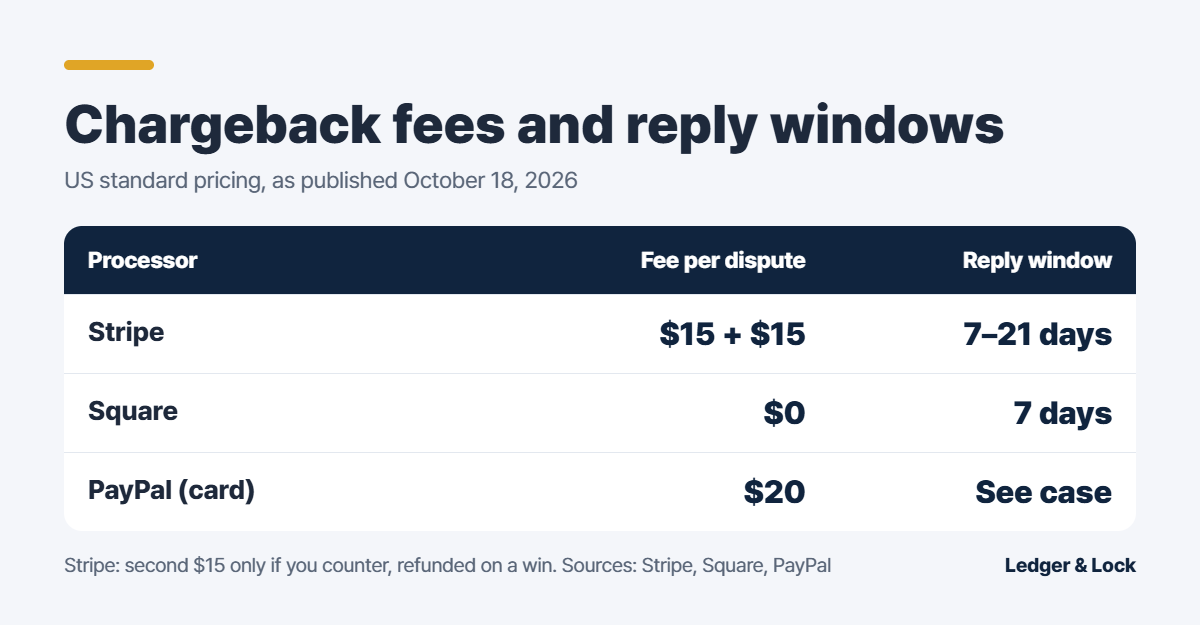
- A fee may post. Stripe charges $15 when a dispute arrives and another $15 if you counter it. The second fee comes back if you win; the first one never does.
- Normal refunds stop. Stripe will not let you refund a payment outside the dispute process while the dispute is open.
| Processor | Fee when a dispute arrives | Time to respond | Evidence limits |
|---|---|---|---|
| Stripe | $15 received, plus $15 if you counter (the countered fee is returned on a win) (pricing) | Usually 7 to 21 days, set by the card network. One submission only. | 4.5 MB combined; Mastercard cases 19 pages max; no links, audio, or video |
| Square | No dispute fee (help center) | Seven days from the first notice email | HEIC, JPEG, PDF, PNG, or TIFF; 5 MB and 15 pages max (guide) |
| PayPal | $20 card chargeback fee on card payments not made through a PayPal account; $15 standard or $30 high-volume dispute fee on PayPal checkout (fee page) | Not stated on the fee page; check the deadline on the case | Not listed on the fee page |
Fees are from each company’s US pricing or help pages as of October 18, 2026. Accounts on custom pricing can differ, so confirm in your own dashboard.
Dispute fees are only part of what a processor costs you. For the everyday rates on online card sales and invoices, our Stripe vs Square vs PayPal fees comparison works through what each one keeps on a $50 sale and adds up one month of fees for a hypothetical print studio.
Whatever you decide, start this sequence today
Seven things have to happen before the deadline, and the fifth is the decision the rest of this page helps you make:
- Write the deadline down twice. Square gives you seven days from its first notice. Stripe shows the due date on the Dispute details page. Put it on your calendar two days early, because turning tracking pages and message screenshots into clean PDFs takes longer than it sounds.
- Read the reason code before the amount. Stripe maps each dispute to a category, and the network code underneath tells you what the bank will weigh. On Visa, 13.1 means merchandise or services not received, 13.3 means not as described or defective, and 10.4 is fraud on a card-absent (online or phone) sale.
- Pull the full order record: invoice or receipt, order date, ship-to address, carrier tracking, the refund policy the customer saw at checkout, and every email, text, or chat with that customer.
- Contact the customer, then keep the record. A replacement or store credit can persuade them to withdraw. Even so, Stripe says you must still submit evidence for a withdrawn dispute to close in your favor, so do not skip the response.
- Decide whether to accept or counter. The math is in the next section; for a small order with no tracking, accepting is often cheaper.
- Build one tight file per evidence type. Stripe accepts one file per evidence type, so merge related pages into a single PDF. Square warns that the bank sees uploads in black and white, so highlighter marks can make text unreadable. Open with a one-page summary: what was bought, what the customer claims, and which numbered exhibit disproves it.
- Submit once, then wait. Stripe does not let you edit or add files after you submit. The issuer usually takes 60 to 75 days to decide, and Square says the bank can take up to 90 days from the start of the dispute. Either way, the decision is final.
The deadline is the one part of a chargeback you control completely. Put it on the calendar the day the notice arrives, even if you have not decided whether to fight.
If the order is small or has no tracking, accepting may cost less
Hypothetical example: a two-person online candle shop on Stripe gets an $86 dispute coded “not received.” Here is what each choice costs under Stripe’s published fees:
- Accept: the shop loses the $86 plus the $15 received fee, $101 total.
- Counter and win: the $86 comes back and the $15 countered fee is refunded, so the net cost is $15.
- Counter and lose: $86 plus $30 in fees, $116 total.
Countering puts $15 more at risk to recover $86. With a delivery scan in hand, that is a reasonable bet. Run the same math on a $12 order with no tracking: accepting costs $27, and a lost counter costs $42. On Square, which charges no dispute fee, the cost of countering is mostly your time.
Before a formal dispute, watch for early fraud warnings. Stripe reports that about 40% of Visa and Mastercard early fraud warnings become fraud disputes when the charge is not refunded. Its analysis suggests refunding flagged charges that are about the size of your dispute fee or less, and says refunds rarely make sense on charges more than 35% above that fee. At a $15 fee, that line sits near $20. American Express and Discover often send an inquiry first; answering it costs no dispute fee, and ignoring it can lead to a chargeback you cannot win.
Whichever way it goes, record the lost sale and each dispute fee as separate lines in your books. Our year-end bookkeeping checklist shows where processor fees fit when you close the year.
If you counter, match the evidence to the reason code
A bank reviewer checks whether your documents answer the specific claim. Square’s document request guide lists contracts, invoices, proof of delivery or service completion, cancellation policies, and customer messages as the core types. Here is how they line up with the most common Visa codes (code list):
| Customer claim (Visa code) | What answers it | Easy to forget |
|---|---|---|
| Not received (13.1) | Carrier tracking with a delivery scan to the ship-to address on the order; for services, signed completion or dated work photos | Messages where the customer agreed to a new delivery date |
| Not as described or defective (13.3) | The product listing or invoice as the customer saw it, plus the return policy shown at checkout | Your offer of a replacement or partial refund, with dates |
| Canceled recurring (13.2) | Subscription terms and proof the customer had not canceled before the charge | The cancellation steps you published |
| Card-absent fraud (10.4) | IP address, device ID, account login, and prior undisputed orders from the same customer | Visa CE 3.0 data (next section) |
For in-person sales, check how the card was read. Square says sellers are protected from fraud disputes on chip cards when the chip is inserted or the card is tapped on Square hardware.
If the bank calls it online fraud, check Visa CE 3.0
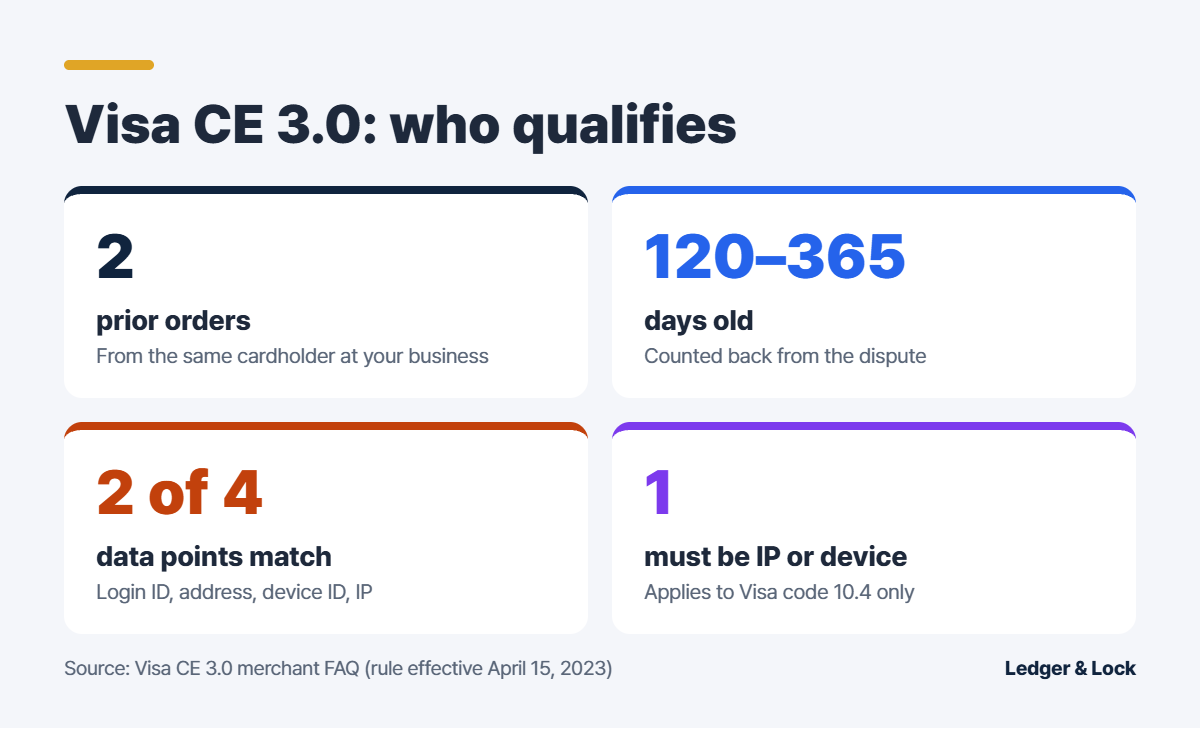
Visa calls it first-party misuse when a cardholder reports fraud on a purchase they actually authorized. Visa’s Compelling Evidence 3.0 rule, in effect since April 15, 2023, gives merchants a specific way to answer Visa 10.4 disputes. You qualify when you can show:
- Two earlier transactions from the same cardholder at your business, each 120 to 365 days before the dispute.
- Neither earlier transaction has an active fraud report or fraud dispute.
- At least two of four data points match across all three orders: customer account or login ID, delivery address, device ID or fingerprint, and IP address.
- One of the two matches is the IP address or the device ID.
Stripe checks eligibility for you and flags it in the dispute email and Dashboard. It pre-fills the required fields; leave those fields as they are, because editing them can break eligibility. If your store platform does not save IP addresses or device IDs with each order, you cannot use this rule. Qualifying orders can be up to 365 days old, so keep that order data for at least a year.
If you want fewer disputes in December
- Promise ship dates you can meet. Under the FTC’s Mail, Internet, or Telephone Order Merchandise Rule, you need a reasonable basis for any shipping time you state, or for shipping within 30 days if you state none. If an order will be late, you must ask the customer to consent to the delay, and without consent you must refund promptly.
- Print your refund policy on receipts. Square notes that if a return policy is absent, it is assumed there is no policy, and its dashboard lets you add one to email, text, and printed receipts.
- Make your statement descriptor recognizable. Stripe says inquiries often start because the cardholder does not recognize the transaction description, so use the shop name customers know.
- Refund through the processor, back to the original card. Square recommends this over cash or checks because it lowers your chance of losing a later dispute.
- Limit who can accept disputes. On Square, any team member with the “Respond to disputes” permission can act on a case, so review that list and protect dashboard logins with the steps in our small-business MFA setup checklist.
Know the customer’s side, too. Under the Fair Credit Billing Act, a cardholder disputing a billing error must get a letter to the issuer within 60 days after the first bill with the error, according to the FTC. The card network window is often longer, typically 120 days, which is why disputes can arrive months after a sale.
A recognizable descriptor and a refund policy on the receipt cost nothing to set up, and both remove reasons for a customer to call the bank first.
Dispute fees belong in the same budget as your processor and software plans; the guide to small business software costs counts them as the last stop in the stack.
A burst of small charges you never sold is a different problem: card testing. Refunding those test charges quickly matters because a cardholder who spots a strange $3 charge often files a dispute, and the guide on how to prevent card testing on your website covers the bot checks and attempt limits that stop the run at checkout.
Chargeback response checklist
- Dispute deadline on the calendar two days early
- Reason code identified (13.1, 13.2, 13.3, 10.4, or other)
- Order record pulled: invoice, tracking, policy, messages
- Accept-or-counter math done with your processor’s actual fees
- One merged file per evidence type, no highlighting, no links
- CE 3.0 eligibility checked on Visa fraud claims
- Refund policy on receipts and a descriptor customers recognize
- Dispute notifications on and dashboard permissions reviewed
Your next step: open your processor’s Disputes page today and switch on alerts. On Square, that is Orders & payments, then Disputes, then Settings, then Notifications, for each location. On Stripe, confirm dispute emails reach an inbox someone checks daily through January.
Related guide: the year-end bookkeeping checklist for 2026, worked through one shop
This article is general information, not legal, tax, or professional advice. Card network rules and processor fees change; confirm current terms in your processor’s dashboard and on its official help pages, and see the FTC business guide for shipping rules.
Leave a Reply