
How much does software cost for a small business? On today’s vendor pricing pages, a 3-person service team can run its books, payroll, bill pay and CRM for about $229 a month, and the card fees on its invoices can cost more than all four subscriptions together.
This guide follows the tools in the order most owners buy them: accounting software first, then invoicing, payroll, bill pay, receipts, a CRM, card payments online and at a counter, and finally the rules for card fees and chargebacks. Each stop gives the price or rule that decides it, re-checked on November 9, 2026, and points to the full comparison on this site. Prices are regular list prices unless a promotion is named, and every vendor reserves the right to change them.
Small business software cost, stage by stage
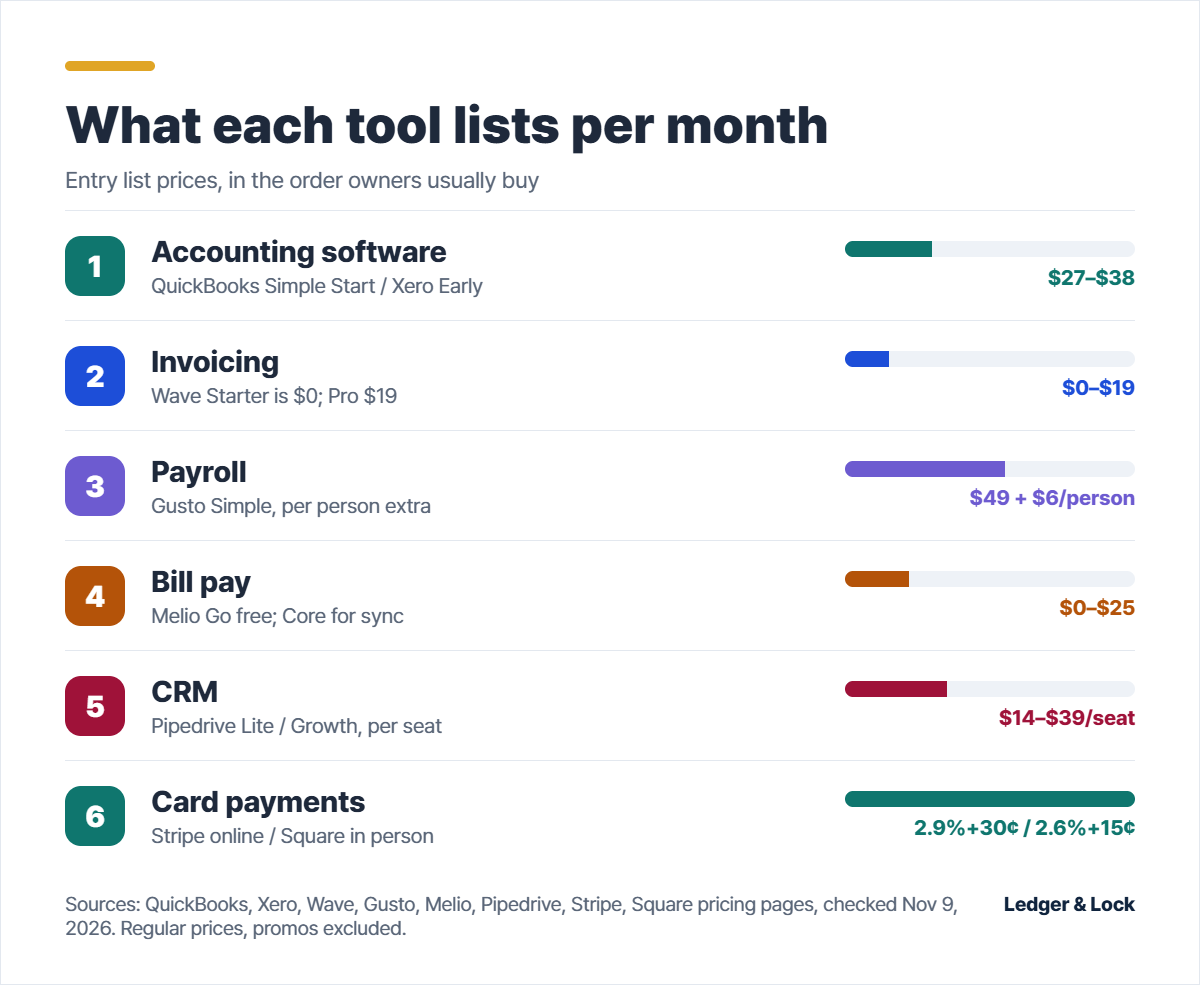
The table puts one entry number per stage next to the thing that usually pushes a business onto a pricier plan. That second column matters more than the first: most owners start on the entry tier and upgrade within a year because of a user cap, an invoice limit or a missing approval step.
| Stage | Entry list price (Nov 9, 2026) | What usually forces an upgrade |
|---|---|---|
| Accounting software | Xero Early $27; QuickBooks Simple Start $38 | Users: QuickBooks caps logins per plan; Xero Early caps invoices at 20 and bills at 5 |
| Invoicing | Wave Starter $0; Wave Pro $19/mo or $190/yr | Card fees: Wave Starter adds 60¢ to every card payment |
| Payroll | Gusto Simple $49 + $6 per person | A second state or time tracking (Gusto Plus, $80 + $12) |
| Bill pay | Melio Go $0 (1 user, 5 free ACH) | Accounting sync and approvals start on Melio Core, $25 + $10 per extra user |
| Receipts | Often included in your accounting plan | Employee expense claims, which some vendors keep for top tiers |
| CRM | Pipedrive Lite $14 per seat (billed annually) | Automated follow-up email (Pipedrive Growth, $39 per seat) |
| Card payments | Stripe 2.9% + 30¢ online; Square 2.6% + 15¢ in person | Volume: fees grow with every sale, subscriptions do not |
| Surcharges and disputes | No software fee; Stripe charges $15 per dispute received | A rise in disputes, or adding a card surcharge without the notice period |
Sources for the table: Xero US pricing, QuickBooks Online pricing, Wave pricing, Gusto pricing, Melio pricing, Pipedrive pricing, Stripe pricing and Square pricing, all read on November 9, 2026.
Here is how those numbers add up for one hypothetical business: a 3-person interior design studio on Xero Growing ($59), Gusto Simple for three people ($49 + 3 × $6 = $67), Melio Core for the owner alone ($25) and two Pipedrive Growth seats ($78). That is $229 a month. If it bills $12,000 a month as 40 invoices of $300 and every client pays by card through Stripe, fees come to 40 × ($8.70 + 30¢) = $360. Move half of those clients to ACH bank debit at 0.8% and the same month costs $228 in fees, a $132 difference that no subscription switch would match.

Start with the books: the user count sets the price
Accounting software is the tool everything else connects to, so pick it before invoicing or payroll. The deciding number is how many people need their own login. QuickBooks Online lists Simple Start at $38 for 1 user, Essentials at $85 for 3 users and Plus at $140 for 5 users, while Xero’s three US plans list at $27, $59 and $97 with no seat count on the plan cards. Both were running intro offers on November 9 (QuickBooks 50% off for 3 months, Xero 80% off for 3 months), so budget for the regular price that renews.
A five-person office with four logins lands two tiers apart on the two vendors, and the QuickBooks vs Xero pricing comparison for a 5-person team, with Zoho Books walks through the user limits, inventory add-ons and what each trial leaves unconfirmed.
Invoicing: where payment fees outweigh the plan
Many solo owners never need more than an invoicing tool in year one. Wave’s Starter plan is $0 but charges 2.9% + 60¢ per card payment, while Wave Pro ($19 a month or $190 a year) drops the 60¢ for the first 10 card transactions each month, then charges it again. On a dozen small invoices a month, that cents portion can decide whether Pro pays for itself.
Plan prices are the smaller half of the bill here. The FreshBooks vs Wave vs QuickBooks Solopreneur invoicing breakdown prices one hypothetical $9,600 freelance month and includes a calculator for your own invoice mix.
First hire: payroll priced per person, not per month
Payroll tools publish a base fee plus a monthly charge for each person paid, and the per-person part grows with every hire. Gusto lists Simple at $49 + $6 per person, Plus at $80 + $12 and Premium at $180 + $22, so a 6-person team on Simple pays $85 a month before add-ons. Xero now sells payroll powered by Gusto as an add-on at $36 a month + $6 per employee or contractor, which is worth pricing if you already keep books in Xero.
The base fee barely separates the big names, which is why the Gusto vs QuickBooks Payroll pricing guide prices a six-person bakery for a full year, including what happens when you add time tracking or a second state.
Scheduling is often the next tool an hourly team needs. As of November 9, 2026, Homebase Basic and Connecteam’s Small Business Plan both list $0 for up to 10 people, and the free employee scheduling app comparison shows what changes when a crew grows past that or needs a second location.
Paying vendors and keeping the receipts
Bill pay: per-user pricing decides it
Bill pay tools charge for seats and for payments past a free allowance. Melio’s free Go plan is limited to one user with 5 free ACH payments a month; Core costs $25 a month plus $10 per additional user with 20 free ACH payments and QuickBooks Online and Xero sync. Xero’s own plans also include standard ACH bill payments at no extra fee, so check what your accounting plan already covers first.
Once an owner wants to approve payments the office manager schedules, a second seat enters the math. The Melio vs Bill.com vs QuickBooks Bill Pay fee comparison prices 30 vendor payments a month at a six-person HVAC shop with two users.
Receipts: what the IRS asks for comes first
A receipt app is only useful if each record shows the amount, date, place and business purpose, the four elements IRS Publication 463 describes. The IRS record retention page says to keep records for 3 years in the usual case, and employment tax records for at least 4 years after the tax is due or paid, whichever is later.
Several accounting plans already capture receipts, so a separate app is often a choice rather than a cost. Read the receipt tracking app guide and its IRS checklist before paying for one, because it compares four ways a six-person crew can handle receipts.
Contracts are the other paperwork cost in this stage. DocuSign and Dropbox Sign both list $25 per user a month on yearly billing, but DocuSign Standard includes 100 envelopes per user per year while every paid Dropbox Sign plan lists unlimited signature requests. The DocuSign vs Dropbox Sign pricing comparison counts what that cap means for two senders and 360 contracts a year.
Is a CRM worth paying for at three people?
A CRM earns its fee when quotes go cold because nobody sends the follow-up. Pipedrive lists Lite at $14 per seat a month and Growth, the first plan with automated email sequences, at $39 per seat, both billed annually. Three Growth seats come to $1,404 for the year.
The usual mistake is choosing on the cheapest seat price and finding the needed feature two tiers up. The CRM cost per month comparison for a 3-person team follows a hypothetical sign shop through HubSpot, Pipedrive and Zoho CRM to the first plan that includes sequences.
Appointment-based businesses often need an online booking page before they need a CRM. For a hypothetical three-person massage studio, Acuity, Calendly and Square Appointments run from $0 to $576 a year in software on annual billing, and the card fees on deposits often decide the rest. The Acuity vs Calendly vs Square Appointments comparison prices that studio all three ways.
A business phone line is the other front-desk bill at this stage. Google Voice’s $10 Starter plan has no phone menu, so an office that wants callers to press 1 for sales starts near $20 per user, the annual-billing price RingCentral lists for RingEX Core. The Google Voice vs RingCentral vs Ooma Office comparison sorts the three by the features that move that price.
Taking cards: fees, POS plans, surcharges and disputes
Card processing is the one cost that grows with sales, so it deserves the closest look. These four guides go in the order the questions come up: which processor, which counter setup, whether to pass the fee on, and what to do when a customer disputes a charge.
Online sales and invoices
Stripe lists 2.9% + 30¢ per domestic card payment, adds 1.5% for international cards, and charges 0.8% for ACH Direct Debit with a $5 cap. That makes a $50 card sale cost $1.75. The Stripe vs Square vs PayPal fee comparison for online sales sets those lines next to Square and PayPal for invoices, foreign cards and fast payouts.
A counter or coffee bar
Square’s free plan lists in-person payments at 2.6% + 15¢; Square Plus costs $49 a month per location and lowers the rate to 2.5% + 15¢. On a $9 coffee ticket, the 15¢ alone is 1.67% of the sale, so the fixed cents matter as much as the percentage. The Square vs Toast vs Clover cost breakdown for a small coffee shop runs about 3,000 card sales a month through each vendor’s published plans and hardware prices.
A booth at a weekend fair adds a test the counter never faces: what the reader does when the hall loses its signal. Square’s Free plan, SumUp’s Standard plan and Shopify POS Basic all list tap and chip at 2.6% plus 10¢ or 15¢, so the card reader for craft fairs comparison of Square, SumUp and Shopify POS turns on offline limits, reader prices and payout timing instead.
Gift cards are the other counter decision before the holidays. Square adds a 2.5% load fee on its Free and Plus plans when a card is sold and nothing when it is redeemed, while Shopify has no load fee but charges stores created on or after May 12, 2025 a third-party transaction fee on the gift-card part of an order. The gift card program cost breakdown for a small business works the per-card numbers at 20, 100 and 400 cards.
Passing the fee to customers
Visa’s merchant page says a business must notify its acquirer 30 days before it starts surcharging, and a surcharge applies to credit cards only, never debit. A convenience fee is a different thing with different rules. The credit card surcharge vs convenience fee guide pairs common myths with the Visa and Mastercard rule text and state limits.
When a customer disputes a charge
Stripe’s pricing page lists a $15 fee for each dispute received and another $15 if you counter it. Cardholders typically have up to 120 days to file. The chargeback response guide for Stripe, Square and PayPal lays out the deadline, the evidence to match to each reason code, and when accepting costs less than fighting.
If you are this kind of business, compare these first
Not every business needs all ten stops. The table matches four common setups to the guides above that are most likely to change their monthly bill, with the number to check first.
| If you are | Compare first | The number to check |
|---|---|---|
| Solo freelancer billing clients | Invoicing tools, then online card fees, then receipts | Card fee cents per invoice (Wave Starter 60¢, Stripe 30¢) |
| 3-person service or sales team | Accounting software, payroll, CRM | Per-user caps and per-person payroll charges |
| Coffee shop or counter business | POS costs, surcharge rules, payroll | Fixed cents on a small ticket (15¢ on $9 is 1.67%) |
| Online seller | Online card fees, chargebacks, surcharge rules | Dispute fees ($15 per dispute at Stripe) and the 120-day window |
| Office paying 30+ vendor bills | Bill pay, receipts, accounting software | Users who need to approve payments and free ACH allowances |
Price the stack by what grows: users, people on payroll and card volume. Flat plan fees rarely decide it.
One thing this guide does not cover: industry-specific software (construction job costing, salon booking, medical billing) and plans priced only through a sales call, such as ADP RUN, which lists no public price. Ask for those quotes in writing.
Questions owners ask about software budgets
How much should a small business spend on software each month?
There is no official benchmark. Add the tools you need at list price. On November 9, 2026, a hypothetical 3-person team paid $229 a month for accounting, payroll, bill pay and CRM using Xero, Gusto, Melio and Pipedrive pricing pages, before card processing fees.
Is free accounting software enough for a small business?
It can be for a solo owner with simple books. Wave’s Starter plan is $0 with unlimited invoices, but card payments cost 2.9% + 60¢ each (Wave pricing page, Nov 9, 2026). Free tiers usually stop at one user, so a second login or payroll pushes you to a paid plan.
Which software should a new small business buy first?
Accounting software, because invoicing, payroll, bill pay and receipt apps all sync to it. Check how many people need logins first: QuickBooks Online Simple Start allows 1 user at $38 a month, Essentials 3 users at $85 (QuickBooks pricing page, Nov 9, 2026).
Is it cheaper to pay for business software annually?
Often, but it locks you in. Wave Pro costs $190 a year versus $19 a month ($228 a year), and Pipedrive’s listed seat prices assume annual billing (vendor pages, Nov 9, 2026). Pay monthly for the first few months until you know the plan fits, then switch.
Your next step: pull last month’s bank statement, list every software charge and card fee line, and compare the total with the stage table above. The stage where your actual spend differs most from the entry price is the guide to read first.
This guide is general information, not tax, legal or professional advice. Prices and fees change; confirm them on each vendor’s pricing page and IRS Publication 583 for recordkeeping basics before you sign up.
Leave a Reply